New research guide: The Confidence Economy, how AI is changing fashion commerce.
Peak Season, Google Shopping, Operations
·
Google Merchant Center Before Black Friday 2026: The Delivery Settings That Decide Your "Arrives By" Date
How Google calculates the delivery date on Shopping ads, the cutoff, handling and transit settings to change for peak season, and how to keep free and fast shipping labels.
Mehul Agarwal, Founder & CEO

Last updated: October 2026
Quick answer: Before Black Friday (27 November 2026), check four delivery settings in Google Merchant Center: your order cutoff time (Google defaults to 8:00 a.m. PST if you leave it blank), your handling time for peak weeks, your transit times, and your business days. Google shows shoppers an "arrives by" estimate calculated as maximum handling days plus maximum transit days, adds a day when handling or transit overlaps a holiday such as Thanksgiving or Christmas, and only shows free and fast shipping annotations when your Merchant Center settings match what your checkout actually offers. Update them before the peak, not during it.
For a Shopify fashion brand, Google Shopping ads and free listings are often the first place a holiday shopper sees your delivery promise. That "arrives by" date and any free or fast shipping label come from your Merchant Center settings, not from your Shopify store. If you lengthen your processing time for December in Shopify and forget Merchant Center, Google keeps showing your September promise.
This guide walks through what Google uses to calculate delivery estimates, the peak-season settings to change, how the free and fast shipping annotations work, and the mistakes that cost listings in the busiest weeks. It is based on Google's Merchant Center Help documentation. For the carrier dates themselves, see our US holiday shipping cutoffs playbook.
How Google calculates your delivery estimate
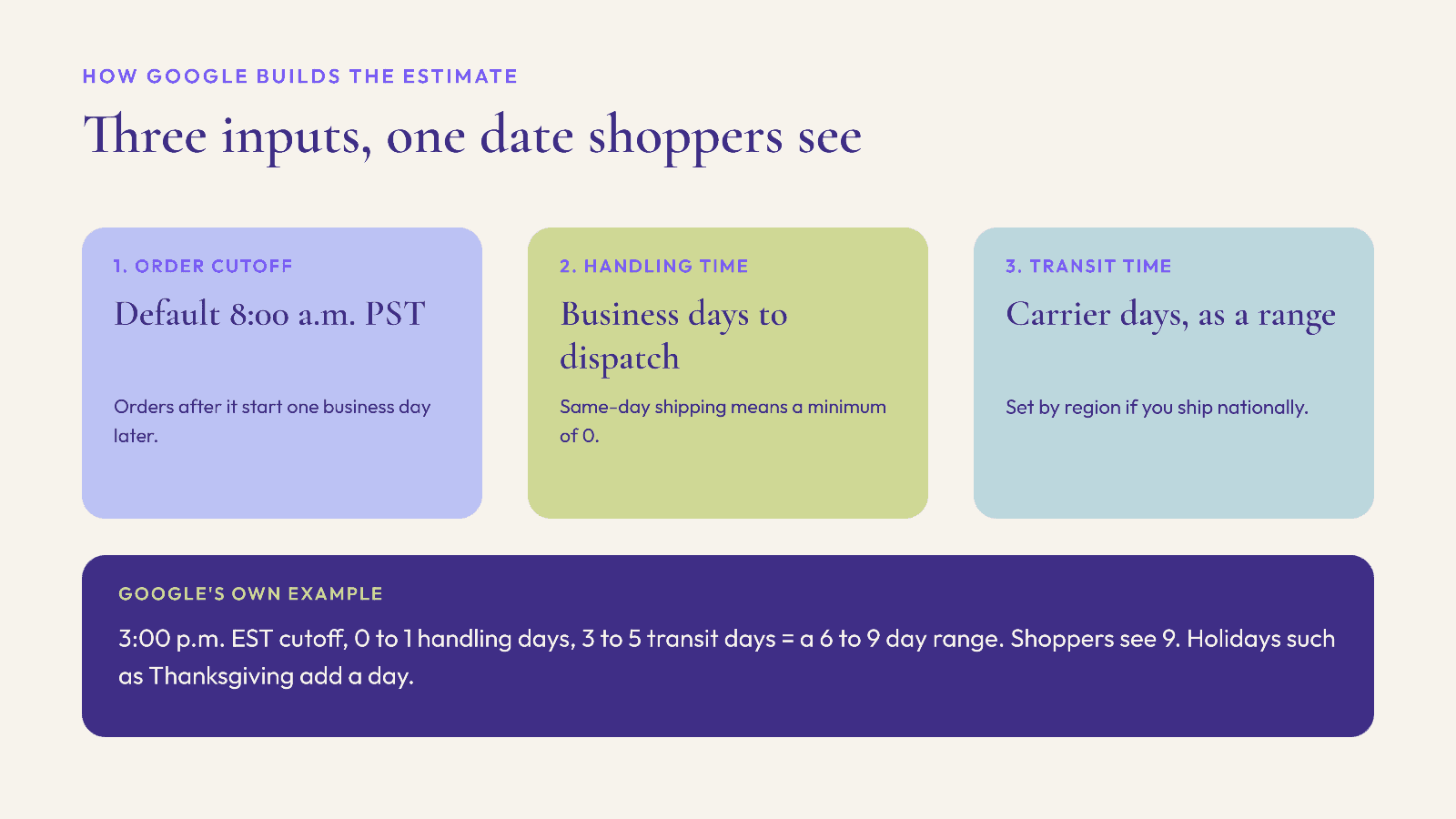
According to Google's Merchant Center Help Center, the estimated delivery date is the "arrives by" date shown to shoppers, and it is calculated as maximum handling days plus maximum transit days, counted in business days, starting from your order cutoff.
Three inputs drive it:
Order cutoff time. The time by which a customer must order for you to start processing that day. If you leave it blank, Google uses 8:00 a.m. PST. Orders after the cutoff get an extra business day.
Handling time. The business days you need to pick, pack and hand an order to the carrier. If you ship the same day, the minimum is 0.
Transit time. The business days the carrier takes after pickup, entered as a range (for example 3 to 5 days), or by region.
Google's own worked example: a 3:00 p.m. EST cutoff, 0 to 1 handling days and 3 to 5 transit days produce a 6 to 9 day range, and shoppers see the longer figure to allow for delays.
Holidays add a day. Google lists non-business days by country, including the US and UK. If handling or transit time overlaps one of them, Google extends the estimate by a day. For the US, Google's list includes Thanksgiving and Christmas Day. In 2026, Thanksgiving is Thursday 26 November, the day before Black Friday.
The peak-season settings to change before Black Friday
Work through these in Merchant Center under Shipping and returns, then Shipping policies.
1. Set a real cutoff time
The 8:00 a.m. PST default is early for most brands on the US East Coast and very early for UK brands selling into the US. If your warehouse can process orders placed until 2 p.m. local time, enter that. A later, accurate cutoff can shorten the estimate shoppers see by a full business day.
If you manage shipping through your product feed, Google supports a cutoff time on the shipping attribute. According to Merchant Center specialists at FeedArmy, the sub-attributes include a 24-hour cutoff time, a time zone, and an option to stop showing next-day delivery once the cutoff has passed. They also warn that cutoffs set in the Merchant Center interface apply to all products, so mixing feed-level and account-level cutoffs needs care.
2. Raise handling time for the weeks you are slower
Many brands take longer to process orders between Black Friday and mid-December. If your normal handling is 1 day but December is realistically 2 to 3, update the maximum handling time before 27 November. Google also supports product-level handling times through the min_handling_time and max_handling_time attributes, which override account settings for those products only. Use them for made-to-order or personalised items that take longer.
3. Check transit times by region
If you only entered one national transit range when you set up the account, consider regional transit times. A shopper two zones away from your warehouse should not see the same estimate as one in the next state.
4. Confirm your business days
Google's help page on handling business days says the attribute is optional and only needed if your operating days differ from the default. If you ship on Saturdays during peak, add Saturday so Google counts it. If you close the warehouse between Christmas and New Year, make sure your settings reflect that.
5. Mirror Shopify
Whatever you change in Merchant Center, change in Shopify too, and the other way round. Your Shopify processing time, the delivery dates at checkout and the "order by" dates on your site should all tell the same story as Google.
Free and fast shipping annotations: how to qualify
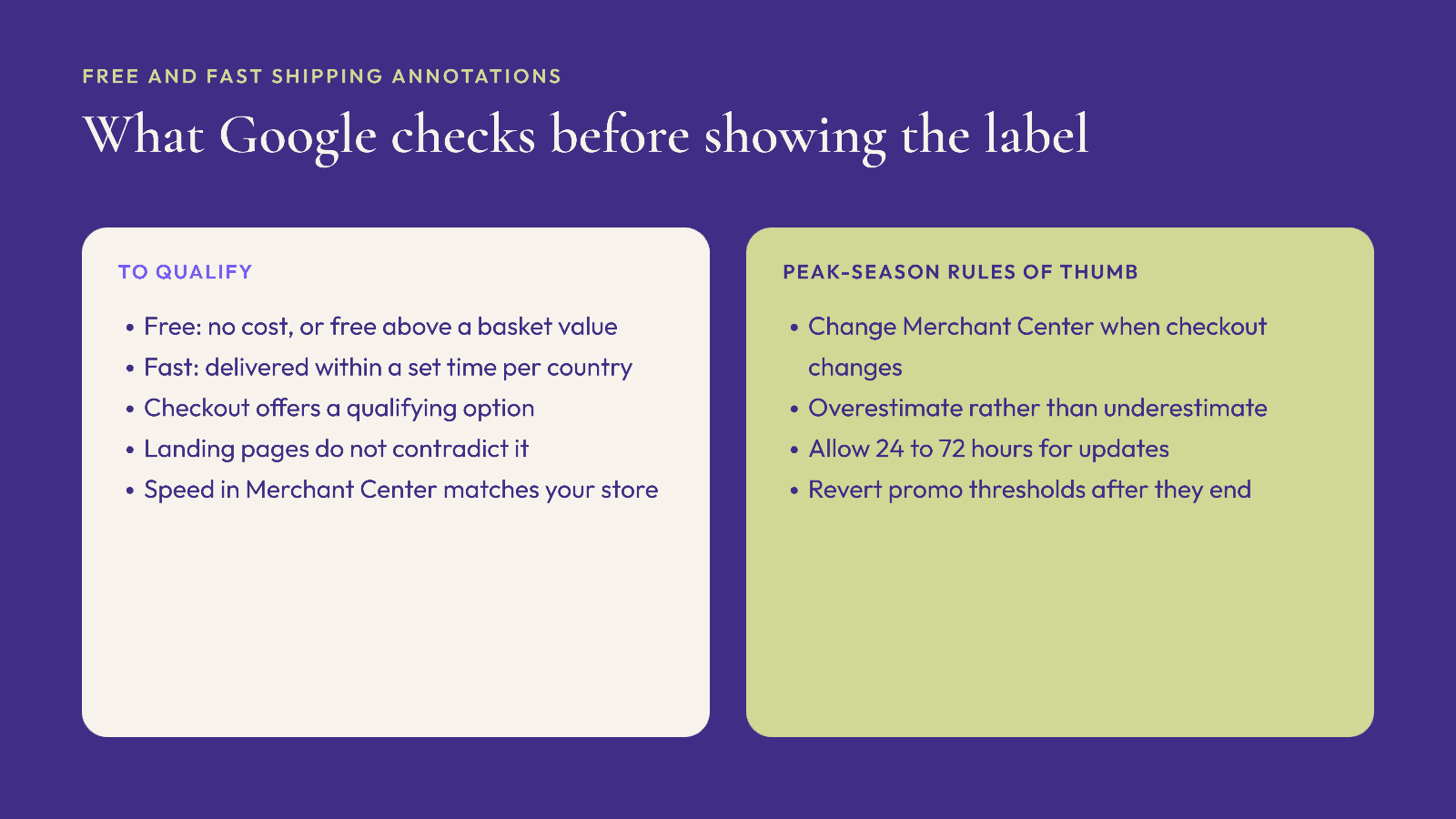
Google can add free shipping and fast shipping labels to your listings, which helps you stand out in a crowded holiday results page. According to Google's help article on these annotations:
Free shipping means you ship at no cost to the customer, or at no cost once the order meets a minimum basket value.
Fast shipping means you deliver within a specified time, which varies by country.
The programme is available for products in the US, Australia, Brazil, Canada, India, Japan, the UK and New Zealand.
Your checkout must offer at least one qualifying shipping option, and your landing pages must not contradict the claim.
Shipping speed in Merchant Center must match your online store. Where an exact match is not possible, Google advises you to "overestimate the delivery time in Merchant Center."
Google verifies eligibility by reading your product and checkout pages, and in the US you can also provide historical shipping data through a linked partner or a file upload.
The peak-season trap: if you run a free-shipping threshold for Black Friday week only, or switch to slower shipping in December, update Merchant Center at the same time. A listing that promises free or fast shipping your checkout no longer offers is exactly the mismatch Google checks for.
Mistakes that cost listings in peak weeks
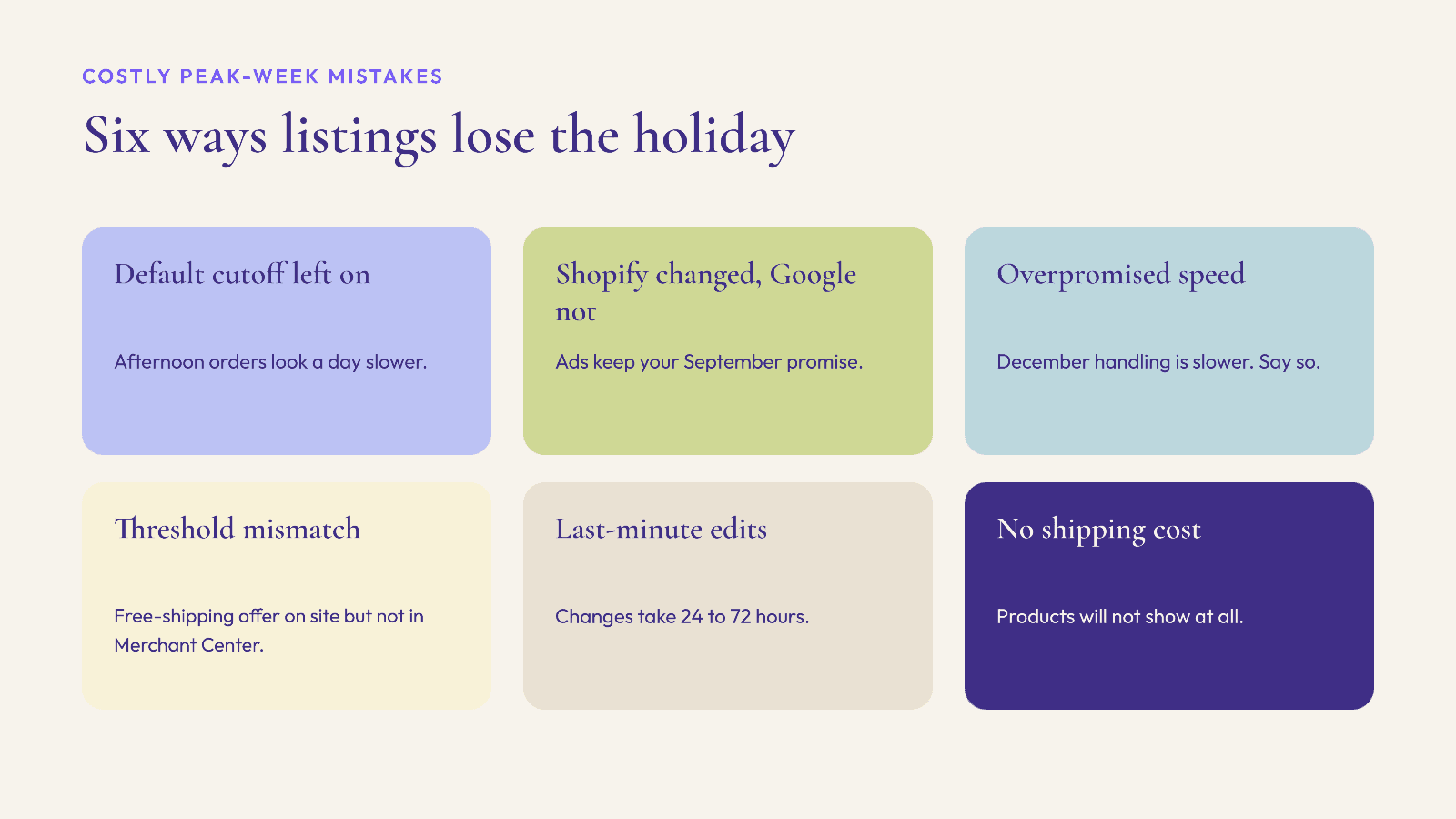
Leaving the cutoff at the default. Your estimate is a business day longer than it needs to be for every afternoon order.
Changing Shopify but not Merchant Center. Google keeps showing your old promise.
Overpromising speed. If your December handling is slower, say so. Google's own guidance is to overestimate rather than underestimate.
Adding a free shipping threshold on the site but not in Merchant Center, or the reverse. Either way, the annotation and the checkout disagree.
Forgetting that changes take time. Google says shipping fixes can take 24 to 72 hours to show in your account, so do not leave updates to Thanksgiving week.
Missing shipping costs entirely. Google's help page is blunt: products without a shipping cost "won't show to customers until you add a shipping cost."
A pre-Black Friday Merchant Center checklist
Run this in the first half of November:
Cutoff time set to your real warehouse cutoff, in the right time zone.
Maximum handling time updated for peak weeks.
Product-level handling times on made-to-order or slow items.
Transit times reviewed, by region if you ship nationally.
Business days include any extra peak days you will work, and exclude days you will close.
Free shipping threshold and fast shipping settings match what checkout offers, for each promotion window.
Shopify processing time, checkout delivery dates and on-site "order by" dates match Merchant Center.
A calendar reminder to revert settings after the peak.
FAQ
How does Google calculate the delivery date on Shopping ads?
Google's Merchant Center Help says the "arrives by" date is maximum handling days plus maximum transit days, counted in business days from your order cutoff. Orders after the cutoff get an extra business day, and a day is added when handling or transit overlaps a holiday.
What is the default order cutoff time in Merchant Center?
If you leave it blank, Google uses 8:00 a.m. PST. Setting your real cutoff, in the right time zone, can shorten the estimate shoppers see for afternoon orders.
Does Google account for Thanksgiving and Christmas in delivery estimates?
Yes. Google lists non-business days by country, including Thanksgiving and Christmas Day in the US, and extends the estimate by a day when handling or transit time overlaps one of them.
How do I get the free shipping or fast shipping label on Google?
Set up free and fast shipping in your Merchant Center shipping settings, make sure checkout offers a qualifying option, and keep your landing pages consistent with the claim. Google verifies by reading your product and checkout pages. The programme covers the US, UK, Canada, Australia, Brazil, India, Japan and New Zealand.
How long do Merchant Center shipping changes take to apply?
Google says fixes can take 24 to 72 hours to reflect in your account, so make peak-season changes in early November rather than Thanksgiving week.
Accurate delivery promises get shoppers to your store. Helping them choose once they arrive is a different job. Elara is an AI shopping assistant for Shopify fashion brands that turns a shopper's occasion or style question into complete looks from your catalog, with virtual try-on, and attributes revenue to each styling conversation. Rep AI's 2025 benchmark puts the AOV lift from AI shopping assistants at 25% (industry benchmark, not an Elara result). Book a demo or start a 30-day free trial before the peak.
Keep reading

Peak Season, Compliance, Shopify
Selling to the EU This Christmas? The GPSR Checklist for Shopify Fashion Brands (2026)
What the EU General Product Safety Regulation means for Shopify fashion brands shipping Christmas orders to the EU: product page information, the EU responsible person, labels, accidents and recalls.

Peak Season, Shopify, Omnichannel
After the Last Shipping Day: A Christmas 2026 Local Pickup and Delivery Playbook for Shopify Fashion Brands
How Shopify fashion brands can keep selling physical products after the Christmas shipping cutoff, with pickup in store, local delivery zones and Google's pickup today annotation.

Peak Season, Accessibility, Conversion
Black Friday 2026 Accessibility Check: What the European Accessibility Act Means for Shopify Fashion Stores
What the European Accessibility Act asks of online stores, and a five-week plan to fix sale prices, swatches, size charts, pop-ups and forms on a Shopify fashion store before Black Friday.