New research guide: The Confidence Economy, how AI is changing fashion commerce.
Peak Season, Google Shopping, Virtual Try-On
·
Google Virtual Try-On Before Holiday 2026: The Product Image Checklist for Shopify Fashion Brands
Google now shows your clothes on models and on shoppers' own photos. Image rules, Shopify feed fixes and a five-week plan to be try-on ready by Black Friday.
Mehul Agarwal, Founder & CEO

Last updated: October 2026
Quick answer: Google now runs two apparel try-on features, and fashion brands with a product feed are opted in automatically. One shows your garments on Google's own models from XXS to XXXL and adds a "virtual try-on" badge to free listings and Shopping ads. The other, "Try it on", lets logged-in shoppers see your product on a photo of themselves, but only on free (non-sponsored) results. Whether your products look good in either depends almost entirely on your product images. Before Black Friday on 27 November, audit your hero images against Google's rules: one garment, the whole garment, front-facing, arms down, nothing covering the details, at least 512 x 512 pixels and ideally 1024 or more, with a unique image for every colour variant.
Holiday shoppers increasingly meet your products on Google before they ever reach your store. For fashion, that first impression can now be an AI-generated image of your dress on a model, or on the shopper. Google generates it from the images in your feed. You cannot style the result, but you can control the input.
This playbook explains what each Google feature does, which of your products qualify, the exact image rules from Google's Merchant Center Help pages, how that maps to what your Shopify store sends through the Google & YouTube app, and a week-by-week plan to get it done before Cyber Week.
Two different Google try-on features, and why the difference matters
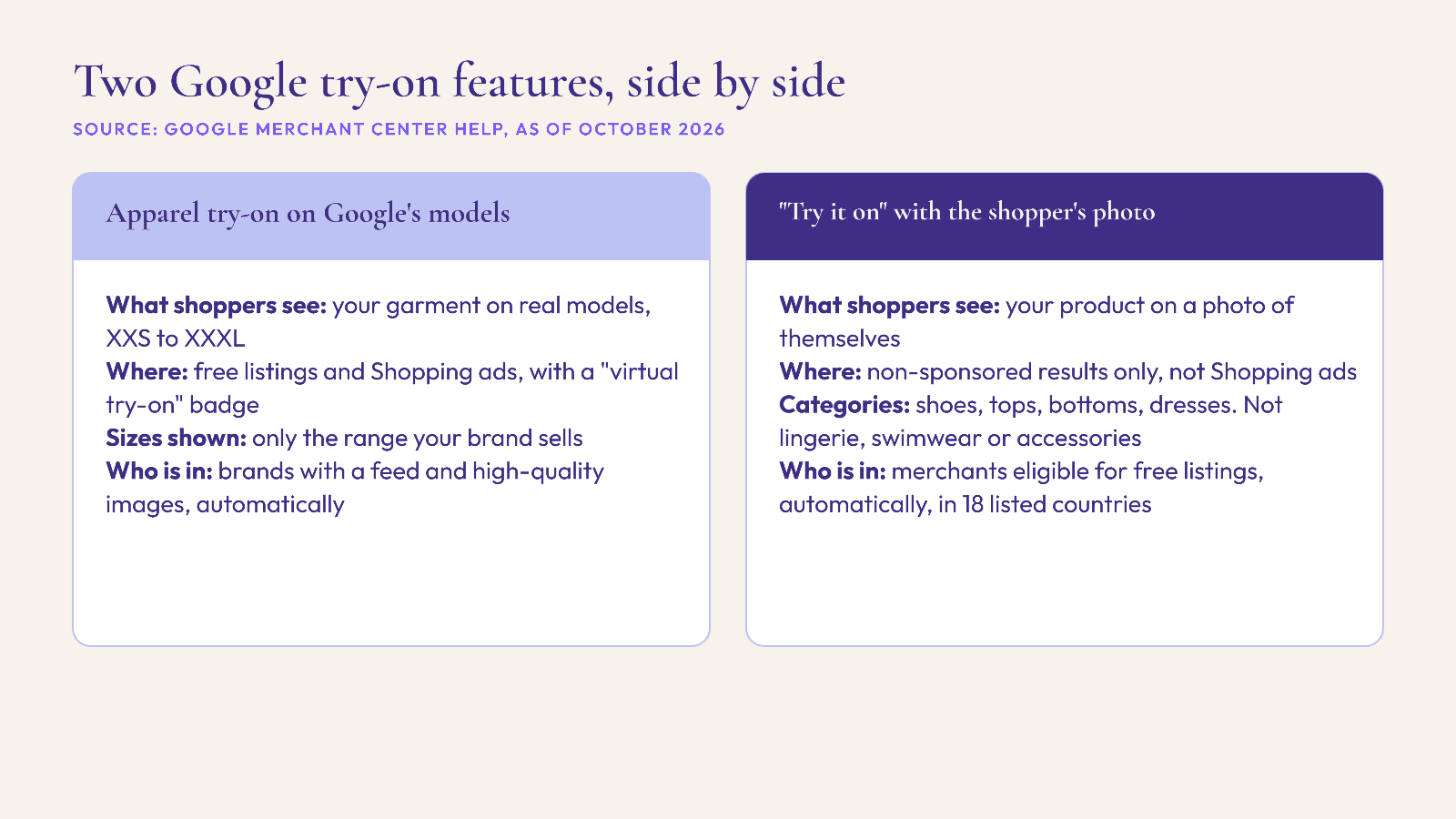
Google's help pages describe two separate experiences. It is worth knowing which is which, because they appear in different places and support different categories.
1. Apparel virtual try-on on Google's models
According to Google's "About apparel virtual try-on" page, this feature shows how clothing looks on real models of different sizes and body types, from XXS to XXXL. The models are real people photographed by Google; generative AI combines those images with your garment photos from Merchant Center to show how the garment drapes, clings and stretches.
Where it appears: qualifying items get a "virtual try-on" badge in free listings and Shopping ads, and can show in Shopping ads on Search through Standard Shopping or Performance Max.
Who is in: brands with a shopping feed and high-quality imagery are automatically opted in.
Size range: Google says it shows only the size range that matches your inventory, so a brand that does not make XXS will not have XXS models shown.
2. "Try it on" with the shopper's own photo
Google's "How Google's Try-on tool works" page describes a second tool. A shopper uploads a photo of themselves, and Google combines it with your product images to generate a picture of how the item might look on them. In the US, shoppers can also create a digital version of themselves from a selfie.
Where it appears: only on non-sponsored product results on Google and the Shopping tab. Google states that Shopping ads do not get the feature, and products under "Sponsored" do not show the "Try it on" button.
Categories: shoes, tops, bottoms and dresses. Lingerie, bathing suits and accessories are not supported.
Countries: the page lists the United States, United Kingdom, Canada, Australia, Argentina, Brazil, Chile, Colombia, Hong Kong, India, Indonesia, Japan, Malaysia, Mexico, the Philippines, Singapore, South Korea and New Zealand.
Who is in: merchants eligible for free listings are automatically opted in.
Shoppers: must be 18 or older, with Web & App Activity and Search Personalization turned on.
The practical takeaway: your free listings carry the most try-on exposure, so feed quality matters even if your paid budget is small. And if you sell swimwear or lingerie, do not plan holiday campaigns around try-on, because Google says those categories are not supported.
What Google says about privacy and accuracy
Two points from Google's help page are worth putting in front of your customer service team, because shoppers will ask.
Accuracy: Google says the generated images are "not a perfect fit representation," may contain mistakes in body shape or clothing details, and do not indicate fit, suggest a size or show size availability. Your size guide and fit notes still do that job.
Privacy: Google states that it "doesn't collect or store any biometric data during this experience," that photos are not used for training, and that merchants have no access to user images or generated looks.
That second point matters for brands: you will not see which products were tried on, or by whom, through this feature. Treat it as an upper-funnel visibility gain, not a data source.
The image checklist Google actually publishes

Both features depend on the images in your feed. Google's try-on pages and its clothing best practices give specific guidance:
Resolution: "at least 512 x 512 pixels, but ideally 1024 pixels or higher" for try-on. Separately, Google's general image rules recommend around 1500 x 1500 pixels for best performance.
One garment, the whole garment: show only the listed item, in full.
Model images: a full-body, front-facing model in a simple pose with arms down to the side. Google's clothing best practices also say to avoid cropping the model's head or feet in full-body shots.
Nothing covering details: no hands, handbags or accessories over the garment.
Tops: sleeves rolled down, hoods down, zips closed, tops untucked.
Flat lays: allowed, but avoid excessive folds or wrinkles.
Background: Google's clothing best practices recommend a solid white or transparent background.
No overlays: Google's image rules prohibit promotional text, prices, discount badges, watermarks and added logos, and borders. This is the one that catches fashion brands during sales, when "30% off" stickers creep into hero images.
Framing: the product should fill no less than 75% and no more than 90% of the image, according to Google's image_link rules.
Notice the tension with typical fashion photography. Editorial hero shots with a hand in a pocket, a jacket worn open over a tucked shirt, or a model mid-stride are exactly what Google's guidance tells you to avoid for try-on. You do not need to replace your creative everywhere. You need one clean, rule-following image as the image Google receives, and you can keep editorial shots as additional images or on your site.
How this maps to your Shopify feed
If you sync through Shopify's Google & YouTube app, Shopify's help centre says your product title, description, images and barcode feed the listing, at least one image is required, and images with text, logos, watermarks or promotional badges should be replaced with clean product images. Three Shopify-side fixes do most of the work:
Put the clean image first. Make the try-on-friendly shot the product's main image. Shopify's help pages do not spell out which image Google treats as primary, so spot-check a few products in Merchant Center after the next sync.
Give every colour variant its own image. Google's image_link rules say to submit a unique image for each variant and not reuse one photo across colours. In Shopify, that means assigning an image to each variant, so a navy shopper does not see your black dress on Google.
Fill in apparel attributes. Shopify notes that Apparel and accessories products might need age group, gender, colour and size before they publish. Google's clothing best practices add item_group_id for grouping variants, and size type for specialty sizes such as petite.
One date to put in the diary beyond the holidays: Google's 2026 product data specification update raises the minimum image size for image_link and additional_image_link to 500 x 500 pixels across all categories, with enforcement starting on 31 January 2027. Google has been showing "Image too small for upcoming enforcement" warnings since 14 April 2026, so check your Merchant Center diagnostics now.
A five-week plan before Cyber Week
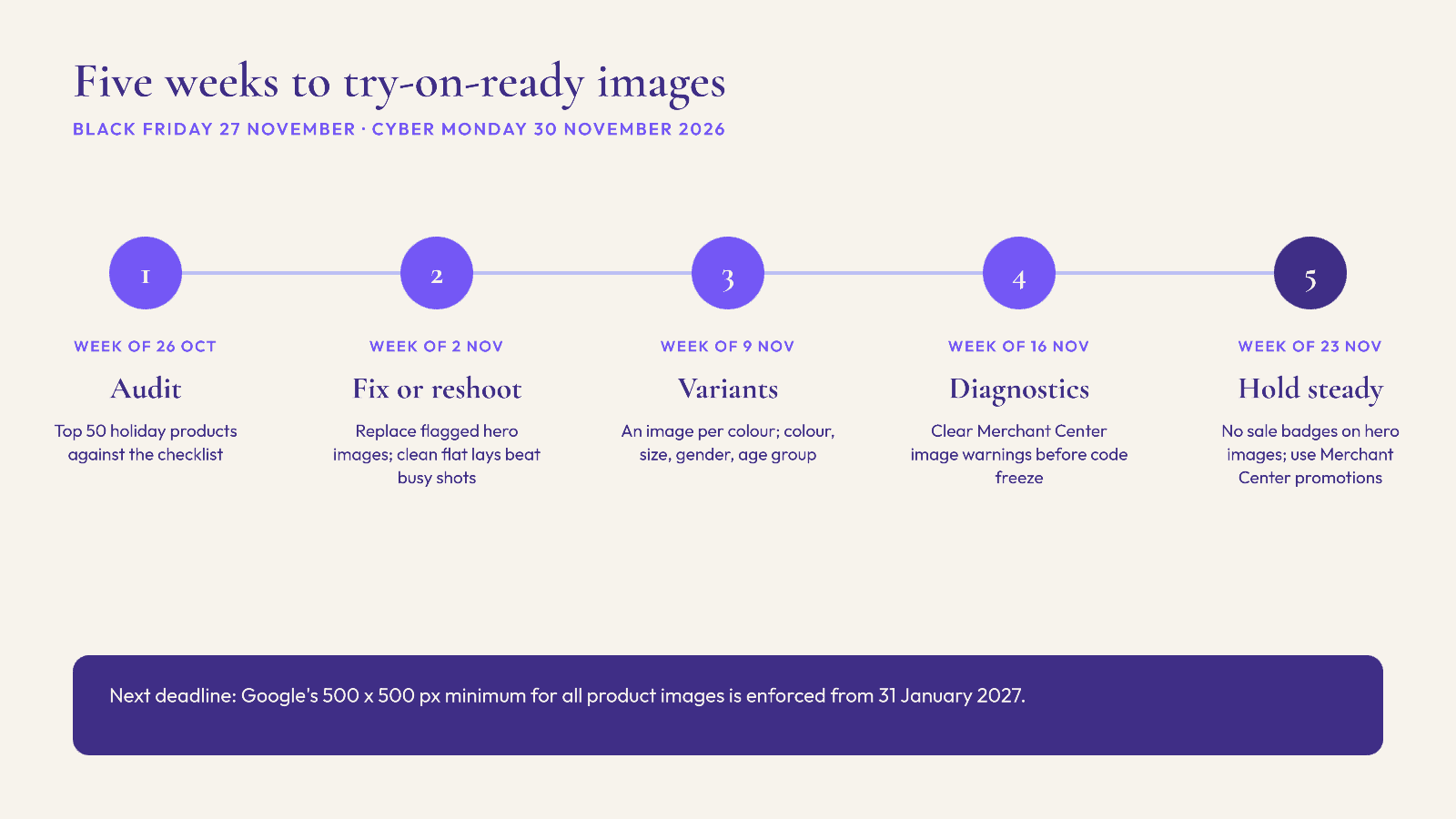
Week of 26 October: audit. Export your top 50 holiday products and check each hero image against the checklist above. Flag overlays, cropped models, hands over garments, tucked tops and anything under 1024 pixels.
Week of 2 November: fix or reshoot. Replace flagged hero images. Where a reshoot is not possible, a clean flat lay is better than a busy editorial shot.
Week of 9 November: variants and attributes. Assign an image to every colour variant and complete colour, size, gender and age group for apparel.
Week of 16 November: check Merchant Center. Review product issues and image warnings after the feed resyncs, and fix disapprovals before your code freeze.
Week of 23 November: hold steady. Keep sale badges off hero images through Black Friday on 27 November and Cyber Monday on 30 November. Put promotions in Merchant Center promotions instead.
If you are also tightening delivery promises, our guide to Google Merchant Center holiday delivery settings covers the shipping side of the same feed.
What Google try-on does not replace on your own store
Google's try-on can bring a shopper to your product page with a clearer idea of how a dress might look. It does not help them choose a size, find the boots that go with it, or decide between two colours once they land. Google itself says the feature does not indicate fit or size. That work still happens on your site.
This is where an on-site AI shopping assistant fits. Elara for Commerce is a conversational AI shopping assistant built for fashion brands on Shopify: it can start the conversation proactively, ask about the occasion, build complete looks from your catalog, and offer virtual try-on on your own store. As industry benchmarks, Neuwark (2026) reports 4x conversion rates with AI shopping assistants, and Rep AI (2025) reports 25% higher average order value. Those are not Elara results, but they show why the on-site step matters as much as the Google one. For more on try-on and returns, see virtual try-on for Shopify: what actually reduces returns.
FAQ
Do I need to opt in to Google's virtual try-on for clothes?
No. Google says brands with a shopping feed and high-quality imagery are automatically opted in to apparel virtual try-on, and merchants eligible for free listings are automatically opted in to the "Try it on" tool.
Which products can use Google's "Try it on" feature?
Google lists shoes, tops, bottoms and dresses. Lingerie, bathing suits and accessories are not supported.
Does virtual try-on show in Google Shopping ads?
The model-based apparel try-on can show a badge in free listings and Shopping ads. The "Try it on" tool that uses the shopper's own photo appears only on non-sponsored results, according to Google.
What image size does Google need for try-on?
At least 512 x 512 pixels, ideally 1024 pixels or higher. Google separately recommends around 1500 x 1500 for general product images, and the minimum for all products rises to 500 x 500 from 31 January 2027.
Can I opt out of Google try-on?
Yes. Google says to contact support from Merchant Center via Help, then Help center and support, then Contact us. Opting out removes the try-on option from your listings only.
Does Google share try-on photos or data with merchants?
No. Google states that merchants have no access to user images or generated looks, and that it does not collect or store biometric data during the experience.
Make the on-site experience match
Google is doing more of the discovery work this holiday season. Make sure the shopper who arrives from a try-on image gets real styling help when they land. Book a demo of Elara for Commerce, or start the 30-day free trial and have it live on your Shopify store before Black Friday.
Keep reading

Peak Season, AI Compliance, Shopify
AI Shopping Assistants This Holiday: EU AI Act Chatbot Disclosure and California's Bot Law for Shopify Fashion Brands
Since 2 August 2026, EU shoppers must be told they are chatting with an AI. What Article 50 and California's bot law mean for your holiday AI assistant.

Peak Season, Shipping, Operations
Canada and Australia Christmas 2026 Shipping Cut-offs: Canada Post and Australia Post Dates for Shopify Fashion Brands
Canada Post and Australia Post Christmas 2026 shipping dates for Shopify fashion brands, plus how to turn carrier cut-offs into an honest order-by date.

Peak Season, Cross-Border, Shopify
Holiday 2026 Cross-Border Orders: US De Minimis, the EU €3 Parcel Duty and a DDP Checklist for Shopify Fashion Brands
US de minimis is gone and the EU now charges €3 per item type on small parcels. What changed, DDP vs DAP for gifts, and a Shopify duties checklist before Black Friday.