New research guide: The Confidence Economy, how AI is changing fashion commerce.
Retail, Shopify, Strategy
·
Holiday Pop-Up Shop 2026 on Shopify POS: Inventory, Offline Payments and Returns for Fashion Brands
How to set up a Christmas market stall or holiday pop-up on Shopify POS: a separate location, stock transfers, offline card payments, POS Pro features and the returns rules for in-person sales.
Mehul Agarwal, Founder & CEO

Last updated: October 2026
Quick answer: To run a holiday pop-up on Shopify POS, set the pop-up up as its own location (and decide whether its stock can fill online orders), move stock there with a transfer so online and in-person inventory stay accurate, and check whether you need POS Pro for exchanges, ship-to-customer and staff permissions. Plan for weak Wi-Fi: Shopify POS takes cash offline for everyone, but card payments offline only work if you turn on offline payments in advance, and discount codes, gift cards, returns and exchanges do not work offline at all. Finally, print your returns policy at the till, because in the UK shoppers have no automatic right to return an in-person purchase just because they changed their mind.
For an online fashion brand, a holiday pop-up might be a Christmas market stall, a weekend in a shared retail space or a studio sample sale. The season is short. Hyde Park Winter Wonderland in London opens on 19 November 2026, and the Nuremberg Christkindlesmarkt on 27 November, according to their official sites, and most indoor holiday pop-ups run from late November until the week before Christmas.
That leaves little room to fix systems once the doors open. This guide covers the setup decisions that matter, based on Shopify's Help Center documentation for POS, locations and offline selling. If you are new to selling in person, start with our overview of Shopify POS for online fashion brands.
Set up the pop-up as its own location
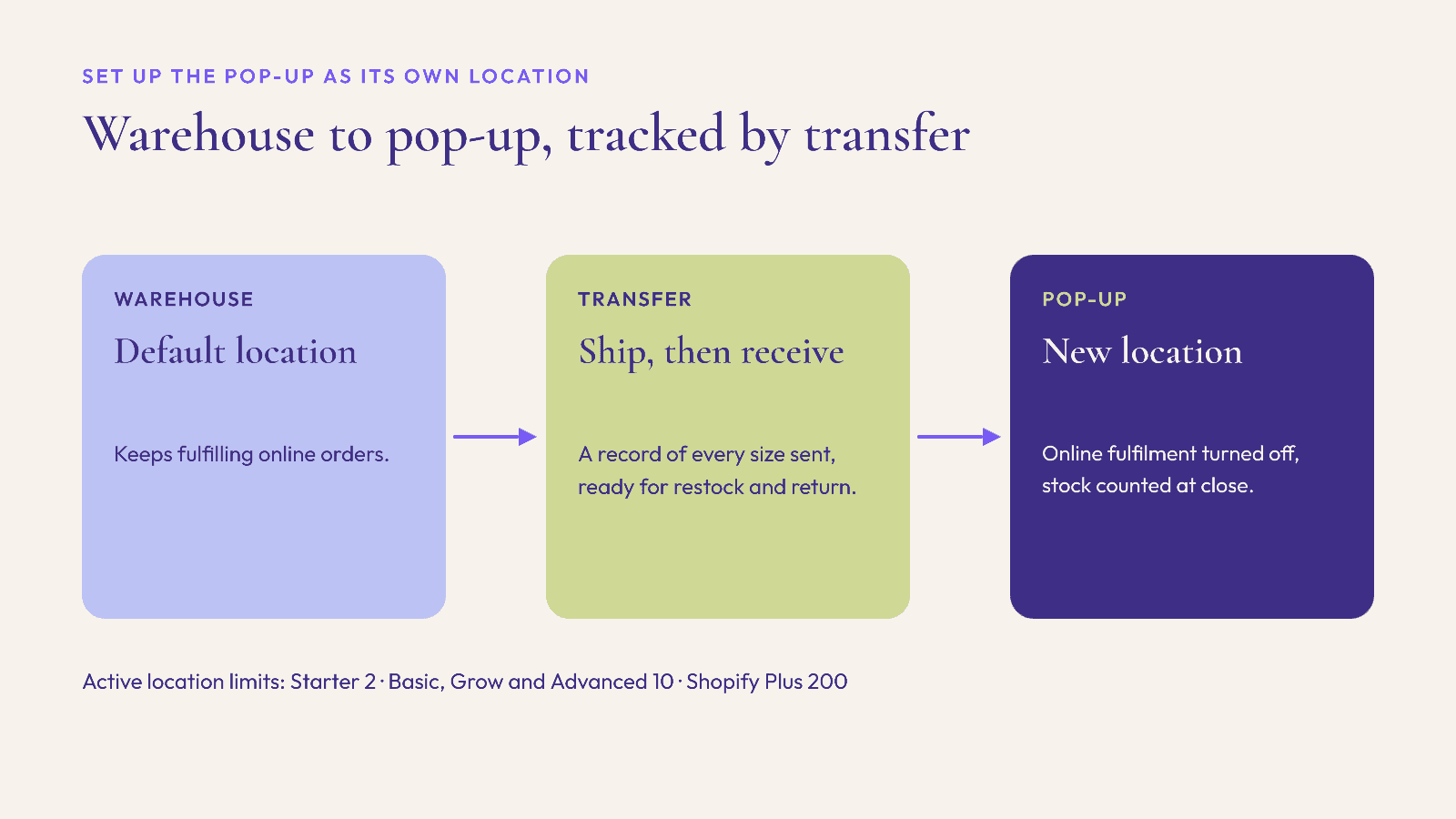
Shopify defines a location as "any physical place where you sell products, fulfill orders, or stock inventory," and lists pop-ups alongside warehouses and retail stores. Giving the pop-up its own location means you track its stock separately, see its sales separately and stop the website from selling a coat that is actually hanging on your market rail.
A few things to know from Shopify's location setup guide:
Add it under Settings, then Locations. Enter a name and address and save. New products start at a quantity of 0 at a new location.
Check your plan's limit. Shopify allows 2 active locations on Starter, 10 on Basic, Grow and Advanced, and 200 on Shopify Plus. Deactivated locations do not count.
Decide whether the pop-up fills online orders. New locations can fulfill online orders by default. For most pop-ups, turn off "Inventory at this location is available to fulfill online orders," so a web order is not routed to a market stall with no packing table.
Plan the close-down. When the pop-up ends, you can deactivate the location, but not while it is your default location, and Shopify will ask you to deal with any open orders or transfers first. POS Pro locations need to be downgraded before you deactivate them.
Move stock with transfers, not manual edits
Rather than lowering stock at the warehouse and typing new numbers in at the pop-up, use an inventory transfer. According to Shopify's Help Center, a transfer moves stock between locations with shipments created automatically, and you can mark it ready to ship, in transit or transferred, add tracking, and receive all or part of it at the destination.
In fashion, that record of exactly which sizes went to the pop-up makes restocking mid-run and bringing unsold stock back afterwards simple.
Some practical habits:
Send a narrow, deep edit. A few styles in a full size run are easier to count and restock than one of everything.
Receive the transfer on arrival, before the first customer, so the POS shows what is actually on the rail.
Count at close each day. Compare what is on the rail with what POS says, and investigate gaps while the day is fresh.
POS Lite or POS Pro: check what you need
Shopify's subscription comparison says POS Lite is included with paid plans and covers core in-person selling. Several features that pop-ups often rely on are POS Pro only, according to the same page:
Exchanges. Handy for "can I swap this for a medium?" at the stall.
Ship to customer. Sell a size you do not have on the rail and ship it from the warehouse.
Staff roles and permissions, plus unlimited POS-only staff, useful for seasonal temps.
Receiving and fulfilling stock transfers.
Pickup in store.
POS Pro has an additional monthly cost per location. For a short pop-up, check how Pro is billed on your plan and plan to downgrade when it closes.
Plan for bad Wi-Fi: what works offline
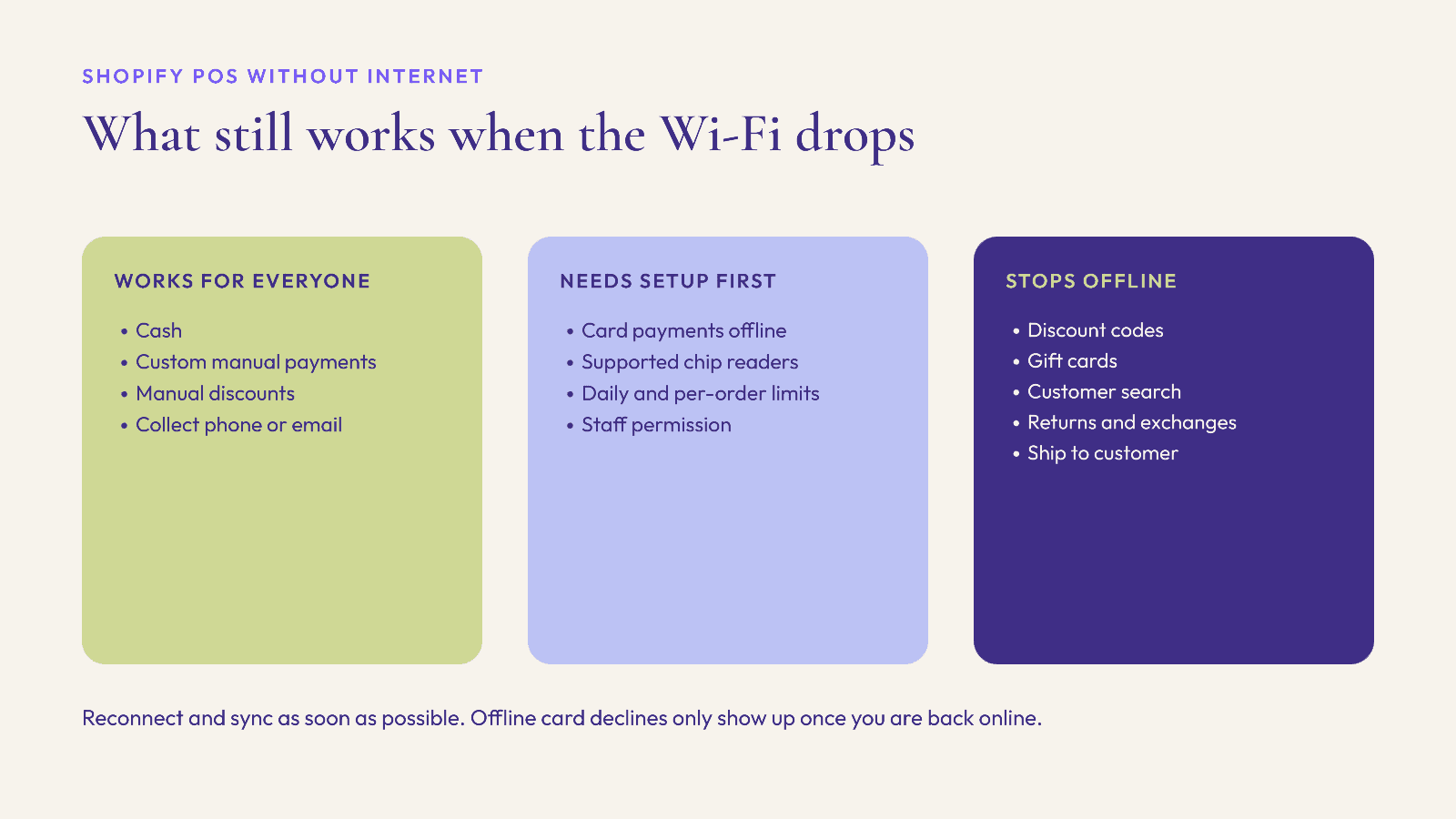
Market stalls and temporary venues often have patchy internet. Shopify says POS needs a connection to sync with your admin, send email receipts and capture card payments, but some selling still works without one.
Cash and custom payments work offline for everyone. Shopify's offline checkout lets all POS users take cash and manual payment types without internet. You need to collect the customer's phone number or email for offline sales, and Shopify warns that signing out of POS or turning off the device while offline "might cause loss of offline orders."
Card payments offline need setup in advance. Shopify's offline payments feature extends offline checkout to credit and debit cards, but only if you turn it on in the admin and meet the requirements:
POS app version 9.14.0 or later, and staff given the permission to accept offline card payments.
A compatible card reader. Shopify lists POS Go, POS Terminal, Tap & Chip, Chipper 2X BT, Wisepad 3 and Chip & Swipe Reader. Swipe, Tap to Pay on iPhone or Android and manual card entry are not supported offline.
A device daily limit and a per-transaction limit, which you set yourself.
Regional exceptions: Shopify says offline payments are not available for retail locations in France, Interac cannot be taken offline in Canada and eftpos cannot be taken offline in Australia.
The trade-off is risk. Offline card payments are not sent to the processor until you reconnect, so a decline only shows up later. Shopify recommends reconnecting "as soon as possible, ideally within 24 hours," and suggests contacting the customer through the details you collected if a payment fails.
Some features stop completely offline. Shopify's offline features page says discount codes and automatic discounts do not work offline (manual discounts do), you cannot sell or redeem gift cards, you cannot search for or create customers, and you cannot process returns, exchanges, voids or ship-to-customer orders. If your pop-up promotion depends on a discount code, set up a manual discount as a backup.
A mobile hotspot as a backup connection is worth packing. Shopify notes that POS can connect over Wi-Fi or cellular data.
Returns and refunds at a pop-up
In-person sales and online sales can carry different legal rights, so do not assume your website policy covers the stall.
UK. Citizens Advice says shoppers have no automatic right to a refund if they change their mind about something bought in a shop, though faulty items are still protected. Online purchases are different, with a 14-day cooling-off period. Warwickshire County Council's Trading Standards adds that gift receipts are not part of consumer law, though the recipient "can usually" return the item themselves under a shop's policy. Many brands still offer change-of-mind returns at pop-ups to make gifting easier, but that is your policy, so state it clearly.
US. The FTC's Cooling-Off Rule gives buyers three days to cancel certain sales made at temporary locations, such as a hotel room, for sales of $130 or more, and requires the seller to give notice and cancellation forms at the time of sale. The FTC says the rule does not cover arts or crafts sold at fairs or places like shopping malls, civic centers and schools. Whether it applies depends on how and where you sell, so check with a lawyer if you are running a pop-up in a rented temporary space.
Whatever you decide, make it easy to follow:
Print the policy at the till and on the receipt. Say whether pop-up purchases can be returned online, in person, or both.
Offer gift receipts, and say how long the return window runs into January. Our holiday returns and January exchanges playbook covers the online side.
Remember returns do not work offline. If a shopper comes back to exchange a size and your connection is down, note their details and process it once you reconnect.
Connect the pop-up to your online store

A pop-up is also a chance to meet customers you will sell to online for years:
Collect contact details with consent. You need a phone number or email for offline sales anyway. Ask for marketing consent separately and record it properly.
Use ship to customer (POS Pro) for sizes and colours you could not bring, so no sale is lost to a short rail.
Make the next purchase easy. Point shoppers to your site with a card in the bag or a QR code at the till.
A pre-opening checklist
Pop-up location added, within your plan's limit, with online fulfilment turned off if you do not want it.
Stock moved by transfer and received on arrival, with a full size run in the core styles.
POS Lite or Pro decided, with staff accounts and permissions set.
Offline payments turned on (if you want them), with limits set and supported card readers tested.
Manual discount set up as a backup to any discount code.
Mobile hotspot packed and charged.
Returns policy printed at the till and on receipts, with gift receipts available.
Daily close routine agreed: count stock, reconnect and sync, check for failed offline payments.
FAQ
Can I use Shopify POS at a pop-up shop?
Yes. Shopify treats a pop-up as a location, so you can add it under Settings, then Locations, track its stock separately and sell with Shopify POS. Starter plans allow 2 active locations, Basic, Grow and Advanced allow 10, and Plus allows 200.
Does Shopify POS work without internet?
Partly. Cash and custom payments work offline for all POS users. Card payments work offline only if you turn on offline payments and use a supported card reader. Discount codes, gift cards, customer search, returns and exchanges do not work offline.
What are the limits on offline card payments in Shopify POS?
You set a device daily limit and a per-transaction limit in the admin. Payments are not processed until the device reconnects, and Shopify recommends reconnecting within 24 hours because declines only appear once you are back online.
Do I need POS Pro for a pop-up?
Not always. POS Lite covers core in-person selling. Shopify lists exchanges, ship to customer, staff roles and permissions, stock transfers and pickup in store as POS Pro features, and Pro costs extra per location.
Do customers have a right to return pop-up purchases?
In the UK, Citizens Advice says there is no automatic right to return an in-person purchase because you changed your mind, unlike online orders, so the policy is yours to set. In the US, the FTC's Cooling-Off Rule may apply to some sales of $130 or more at temporary locations. Check the rules where you sell.
Some of the shoppers you meet at a pop-up will come back to your website, and that is where the conversation continues. Elara is an AI shopping assistant for Shopify fashion brands that lets shoppers describe an occasion or a style and builds complete looks from your catalog, with virtual try-on, so a customer who loved one piece at your stall can find what goes with it. As an industry benchmark, Rep AI (2025) reports 25% higher AOV with AI shopping assistants. Book a demo or start a 30-day free trial before your pop-up opens.
Keep reading

Peak Season, Compliance, Shopify
Selling to the EU This Christmas? The GPSR Checklist for Shopify Fashion Brands (2026)
What the EU General Product Safety Regulation means for Shopify fashion brands shipping Christmas orders to the EU: product page information, the EU responsible person, labels, accidents and recalls.

Peak Season, Shopify, Omnichannel
After the Last Shipping Day: A Christmas 2026 Local Pickup and Delivery Playbook for Shopify Fashion Brands
How Shopify fashion brands can keep selling physical products after the Christmas shipping cutoff, with pickup in store, local delivery zones and Google's pickup today annotation.

Peak Season, Accessibility, Conversion
Black Friday 2026 Accessibility Check: What the European Accessibility Act Means for Shopify Fashion Stores
What the European Accessibility Act asks of online stores, and a five-week plan to fix sale prices, swatches, size charts, pop-ups and forms on a Shopify fashion store before Black Friday.