New research guide: The Confidence Economy, how AI is changing fashion commerce.
Peak Season, Promotions, Shopify
·
BFCM 2026 Discount Stacking on Shopify: How Discount Combinations Actually Calculate
Which Shopify discounts can combine, the order they apply in, the limits that bite during Cyber Week, and a test routine to run before 27 November.
Mehul Agarwal, Founder & CEO

Last updated: October 2026
Quick answer: On Shopify, discounts only stack when the combination setting is switched on for every discount involved, and they apply in a fixed order: product discounts first, then order discounts on the reduced subtotal, then shipping. Customers can enter up to 5 product or order codes plus 1 shipping code, and a store can run up to 25 active automatic discounts. Two percentage order discounts are calculated on the same base, so 10% plus 15% is 25% off, not 23.5%. Test every BFCM combination in a real checkout before 27 November.
Black Friday falls on 27 November 2026 and Cyber Monday on 30 November. For a fashion brand, Cyber Week usually means several promotions live at once: a sitewide percentage, a bundle offer on outfits, free shipping over a threshold, a VIP code and maybe a gift with purchase. Each one is simple on its own. Together they can produce margins you did not plan for, or a checkout that quietly ignores the offer you advertised.
This guide explains how Shopify's discount combinations actually work, using the rules and worked examples in the Shopify Help Center, then gives a testing routine to run before the sale. If you are also deciding how to display was prices and countdown timers, read our guide to Black Friday discount claims first; this piece is about the mechanics.
The three discount classes and which ones combine
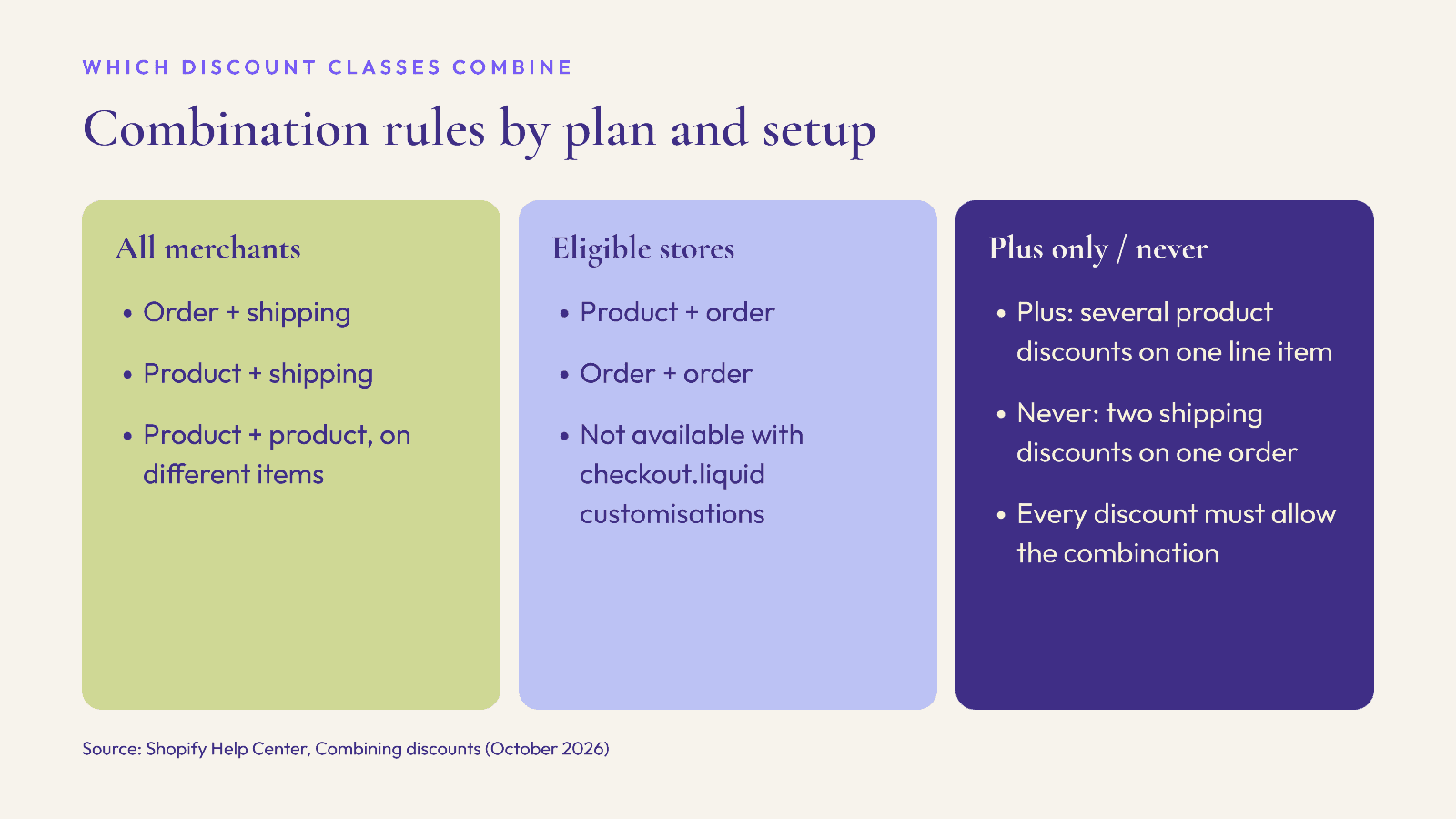
Shopify groups every discount into one of three classes, according to its Help Center page on combining discounts: product discounts (on specific items or collections), order discounts (on the cart subtotal) and shipping discounts (on delivery costs). Which classes can stack depends on your store:
All merchants: order plus shipping, product plus shipping, and product plus product when they apply to different items.
Eligible merchants only: product plus order, and order plus order. Shopify says stores using checkout.liquid customisations, or the Licensify app, are not eligible.
Shopify Plus only: multiple product discounts on the same line item, using matching tags.
Never: two shipping discounts on the same order.
A setting that is easy to miss: discounts do not combine by default, and Shopify applies several discounts to an order "only when the setting on each discount allows the combination." Turning on combinations for your sitewide 20% does nothing if the free-shipping discount it should pair with still has combinations off. When discounts cannot combine, Shopify says it applies the combination that gives the customer the best value, which means the shopper sees one offer and silently loses the other.
How Shopify calculates stacked discounts
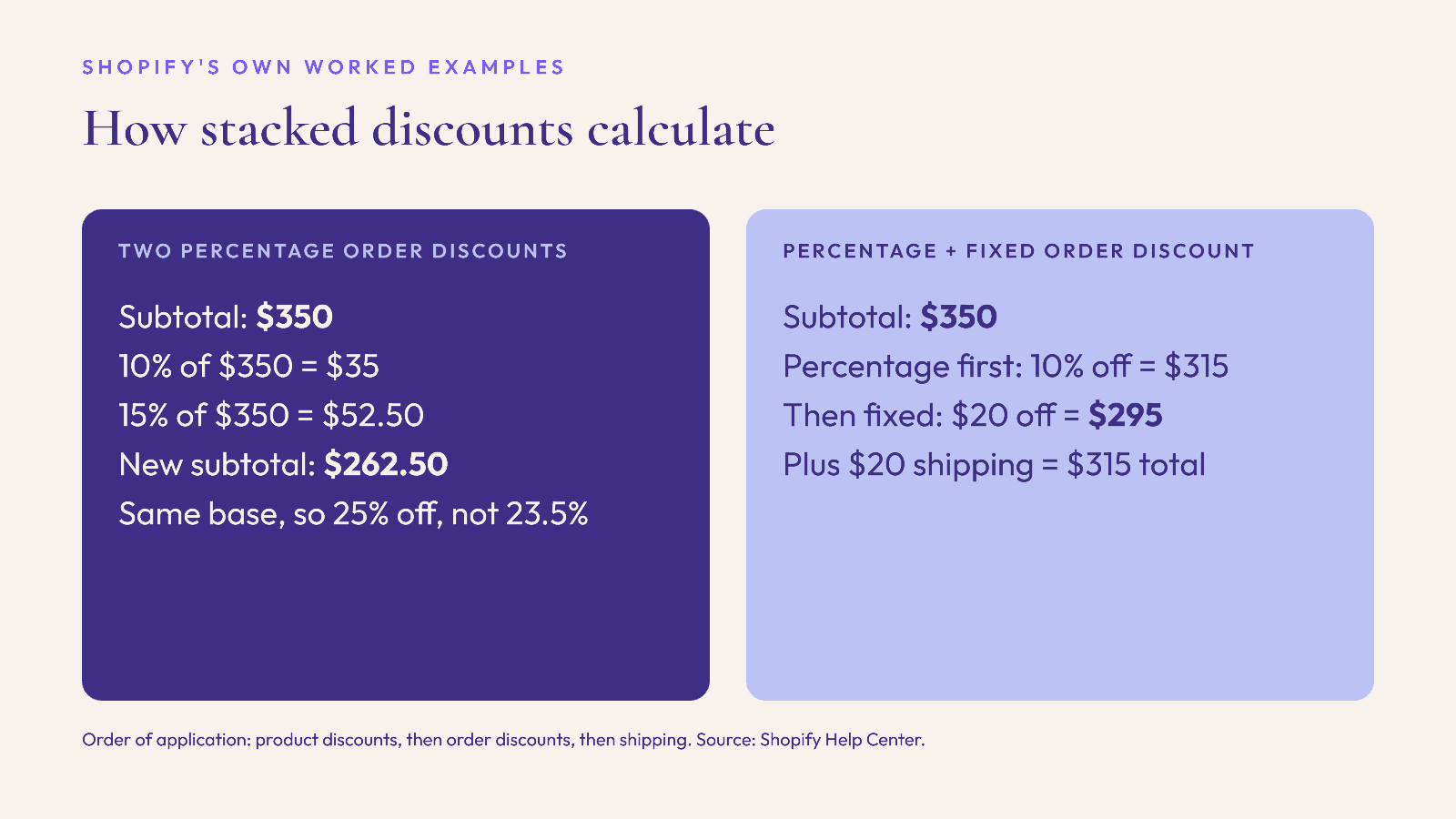
The order of operations is fixed. Shopify applies product discounts to individual items first, then order discounts to the subtotal after product discounts, and shipping discounts last. Three details from Shopify's examples matter most for BFCM planning:
Percentage order discounts add up on the same base. Shopify's example applies a 10% and a 15% order discount to a $350 subtotal and gets $262.50, which is 25% off. They do not compound to 23.5%. If you run a sitewide 20% and let a 10% VIP code combine with it, the VIP customer gets 30% off the subtotal.
Percentage before fixed. When a percentage and a fixed-amount order discount combine, Shopify applies the percentage first and then subtracts the fixed amount. In its example, 10% off $350 gives $315, then $20 off gives $295.
Product discounts change the base. In Shopify's multi-class example, product discounts reduce a cart to $310, and two order discounts of 10% and 15% are then both calculated on $310, giving $232.50 before free shipping.
For fashion promotions, that means a "complete the look" product discount on a jacket and trousers, plus a sitewide order percentage, can land lower than you expect. Model your three or four most likely baskets on paper before the sale goes live.
Limits that matter during Cyber Week
Codes per order: Shopify says customers can use a maximum of 5 product or order discount codes and 1 shipping discount code on the same order.
Automatic discounts: a store can have a maximum of 25 active automatic discounts, and Shopify notes this total includes app-based discounts. If your bundle app, loyalty app and gift-with-purchase app each create automatic discounts, they count against the same 25.
Buy X Get Y: on stores that are not on Plus, products in a Buy X Get Y discount cannot receive further product discounts; if a code targets those products, Shopify applies the best overall discount instead.
Channels: combinations work on orders from the Online Store, the Storefront API and Shopify POS, and Shopify says they are not available for external checkouts such as Facebook, Instagram or Google.
Gift cards: the discounts FAQ says most discounts cannot be applied to gift cards, which matters if you are selling gift cards as a late Christmas option.
Zero-value discounts: Shopify warns that a $0 or 0% discount may not work correctly and recommends at least $0.01 or 1%.
Scheduling: start and end times follow your store's time zone
Shopify's discount codes page explains that active dates follow the time zone set in your Shopify admin. Its example: a store set to Eastern Standard Time with a 26 November start date activates the discount at 12:00 a.m. EST that day. If your store runs on UK or India time but your Black Friday audience is in the US, a midnight start may land in the middle of the previous evening for some shoppers, or hours late for others. Decide which time zone your campaign emails promise, and set start and end times to match. The FAQ also confirms a discount expires on the end date at the end time you set, so an "ends Monday midnight" email needs an end time that agrees.
A pre-BFCM discount test routine
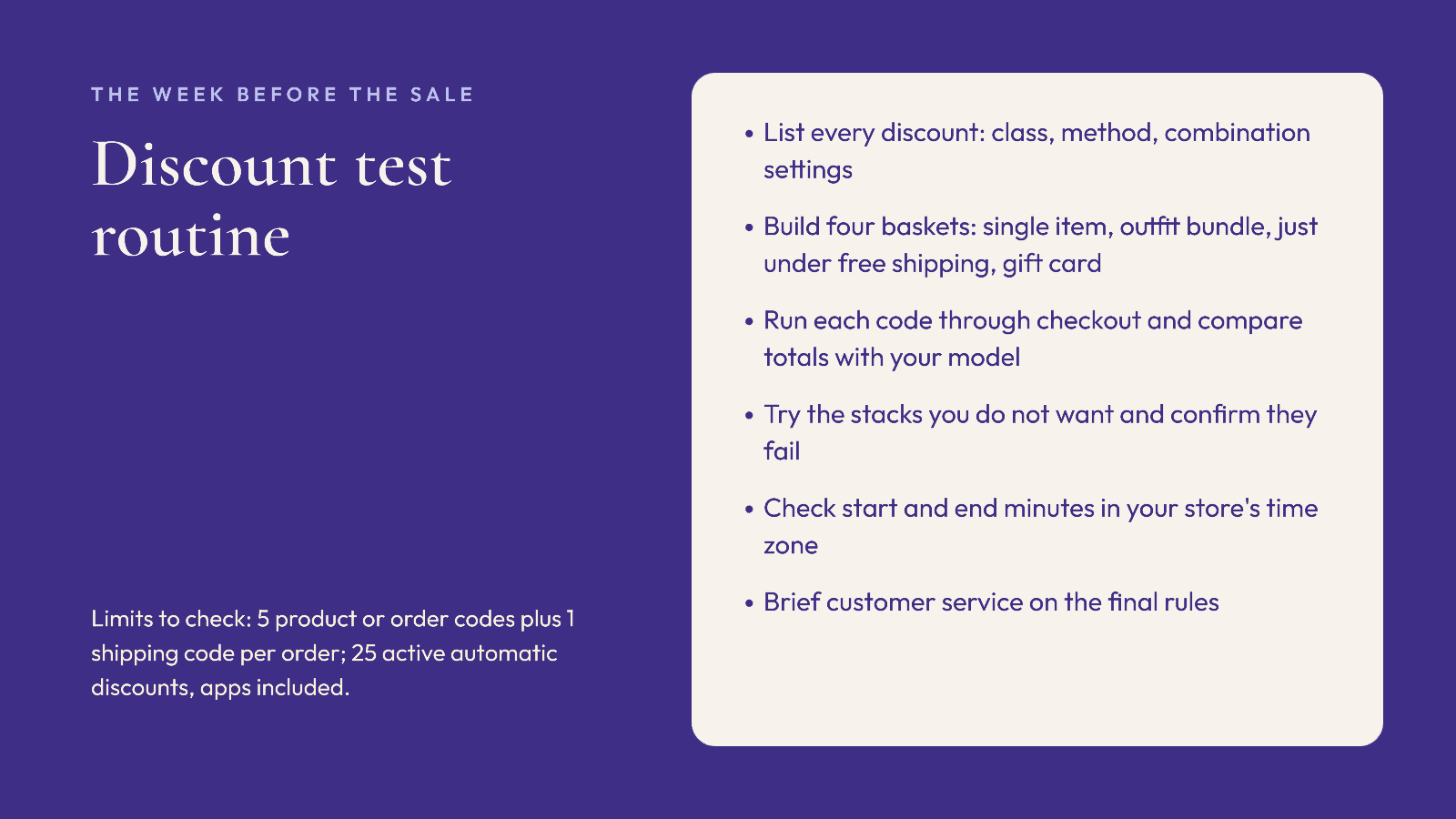
Run this in the week before the sale, on a development or duplicate store if you have one, or with test codes restricted to staff accounts (Shopify lets a code apply to up to 100 specific customers):
List every live and scheduled discount with its class, method (code or automatic) and combination settings. Check the count of automatic discounts against the limit of 25, including app-created ones.
Build four test baskets: a single full-price item, a two-piece outfit bundle, a basket just under your free-shipping threshold, and a basket containing a gift card.
Run each basket through checkout with each code you plan to send, and note the subtotal, discount lines and shipping. Compare against the totals you modelled.
Try the combinations you do not want. Enter two codes that should not stack and confirm Shopify shows "Some discount codes couldn't be used together" rather than accepting both.
Check the edge cases: the start and end minute in your store's time zone, a customer who has already used a one-per-customer code, and a market or currency you sell into.
Write down the final rules for your customer service team, so they can explain why two offers did not combine without issuing manual refunds.
How an AI shopping assistant fits into this
Discounts move shoppers who already know what they want. Some Cyber Week visitors arrive unsure, looking for a gift or an outfit for a party. Elara for Commerce is an AI shopping assistant for Shopify fashion brands: it talks shoppers through what they are shopping for, builds complete looks from your synced catalog, offers virtual try-on, and attributes revenue to each styling conversation, so you can see whether a bundle offer is being found and used. Industry benchmarks put conversion with AI shopping assistants at 4x (Neuwark 2026) and average order value 25% higher (Rep AI 2025); these are industry figures, not Elara results. If you want to see it on your own catalog before peak, book a demo or start the 30-day free trial. For the wider countdown, see our BFCM 2026 site readiness checklist.
FAQ
Can you stack discount codes on Shopify?
Yes, if the combination setting is turned on for each discount involved. Shopify allows up to 5 product or order codes and 1 shipping code per order, and only certain classes can combine depending on your plan and checkout setup.
Do two percentage discounts compound on Shopify?
No. Shopify calculates multiple percentage order discounts on the same base, so 10% and 15% together give 25% off the subtotal, as its own $350 example shows.
How many automatic discounts can a Shopify store run?
Up to 25 active automatic discounts, and Shopify counts app-based discounts in that total.
Why is my Shopify discount not combining with free shipping?
Usually because the combination setting is off on one of the two discounts. Both must allow the combination. Also check that the order is placed through a supported channel such as the Online Store.
What time does a scheduled Shopify discount start?
At the start date and time in your store's time zone, as set in the Shopify admin. A store on Eastern time with a 26 November start activates at 12:00 a.m. EST.
Keep reading

Peak Season, Operations, Shopify
BFCM 2026 Shopify Flow Automations: 7 Workflows Fashion Brands Should Set Up Before Black Friday
The Shopify Flow workflows that take routine Cyber Week jobs off your team: low-stock alerts, size-aware sold-out rules, risk holds, VIP tags and a scheduled end-of-sale clean-up.

Peak Season, Marketing, Compliance
GivingTuesday 2026 Charity Promotions: What Shopify Fashion Brands Must Disclose in the US and UK
Planning a give-back capsule for 1 December? How to state the donation clearly, what US and UK rules expect, product-page copy you can adapt, and a launch checklist.

Peak Season, Compliance, Shopify
Selling to the EU This Christmas? The GPSR Checklist for Shopify Fashion Brands (2026)
What the EU General Product Safety Regulation means for Shopify fashion brands shipping Christmas orders to the EU: product page information, the EU responsible person, labels, accidents and recalls.