New research guide: The Confidence Economy, how AI is changing fashion commerce.
Peak Season, Operations, Shopify
·
BFCM 2026 Shopify Flow Automations: 7 Workflows Fashion Brands Should Set Up Before Black Friday
The Shopify Flow workflows that take routine Cyber Week jobs off your team: low-stock alerts, size-aware sold-out rules, risk holds, VIP tags and a scheduled end-of-sale clean-up.
Mehul Agarwal, Founder & CEO

Last updated: October 2026
Quick answer: Shopify Flow is free on the Basic, Grow, Advanced and Plus plans, and it can run the repetitive Cyber Week jobs your team should not be doing by hand. Before 27 November, set up seven workflows: a one-time low-stock alert for bestsellers, a size-aware sold-out rule, a hold on high-risk orders, an alert for unusually large orders, VIP tagging by lifetime spend, a return-requested notification, and a scheduled clean-up for when the sale ends. Add a "Workflow error occurred" alert so a broken workflow does not fail silently.
Black Friday falls on 27 November 2026 and Cyber Monday on 30 November. For a fashion brand, it is also the week when small operational misses can cost the most: a bestselling coat size sells out with no reorder, a suspicious order ships before anyone looks at it, sale tags stay live after the sale ends. Shopify Flow, Shopify's own automation app, can watch for those events and act on them.
This guide sets out the workflows worth building now, using the triggers, actions and examples documented in the Shopify Help Center. It is written for teams on any Shopify plan; where a feature needs a higher plan, it says so.
How Shopify Flow works, and what your plan includes

According to Shopify's Help Center, Flow is a free app available on the Basic, Grow, Advanced and Plus plans, and "most Shopify Flow features are available across all plans." Every workflow has three parts:
A trigger, the event that starts it. Shopify lists triggers such as Order created, Order paid, Order risk analyzed, Product variant out of stock, Product variant inventory quantity changed, Customer joined segment, Return requested and Scheduled time.
Conditions, the checks that decide whether to continue, such as "the order's risk level is high."
Actions, what Flow does: Add order tags, Add customer tags, Send internal email, Hold fulfillment order, Cancel order, Update product status, Unpublish product and many more.
One plan difference matters for integrations: Shopify says only stores on Grow, Advanced and Plus can use the Send HTTP Request action, which is one way Flow can talk to tools without a native Flow connector. Basic stores can still use internal emails, tags and app actions from apps that support Flow.
Workflow 1: a low-stock alert that fires once
Shopify's own example uses the Inventory quantity changed trigger (listed in the reference as Product variant inventory quantity changed) with two conditions: one on the current variant quantity and one on the prior quantity, so the workflow only continues when stock has just crossed your threshold. As Shopify explains, the prior-quantity check makes the workflow run only once, when stock first drops below the line, instead of emailing your buyer on every sale after that.
For BFCM: set thresholds per product type rather than one number for the store. A hero coat might need an alert at 20 units per size, a scarf at 5. Send the alert to whoever can actually reorder or move stock between locations.
Workflow 2: a sold-out rule that respects sizes
Shopify offers templates to "hide and republish products based on inventory level." For fashion, be careful with what you hide. The Product variant out of stock trigger fires per variant, so a rule that unpublishes the whole product when one size sells out would hide a style that still has four sizes in stock.
A safer setup: when a variant goes out of stock, check whether the product has any inventory left before using Unpublish product or Update product status. If sizes remain, tag the product instead (for example "low-size-run") so merchandisers can move it down collection pages. Pair it with a Product variant back in stock workflow that reverses the change.
Workflow 3: hold high-risk orders before they ship
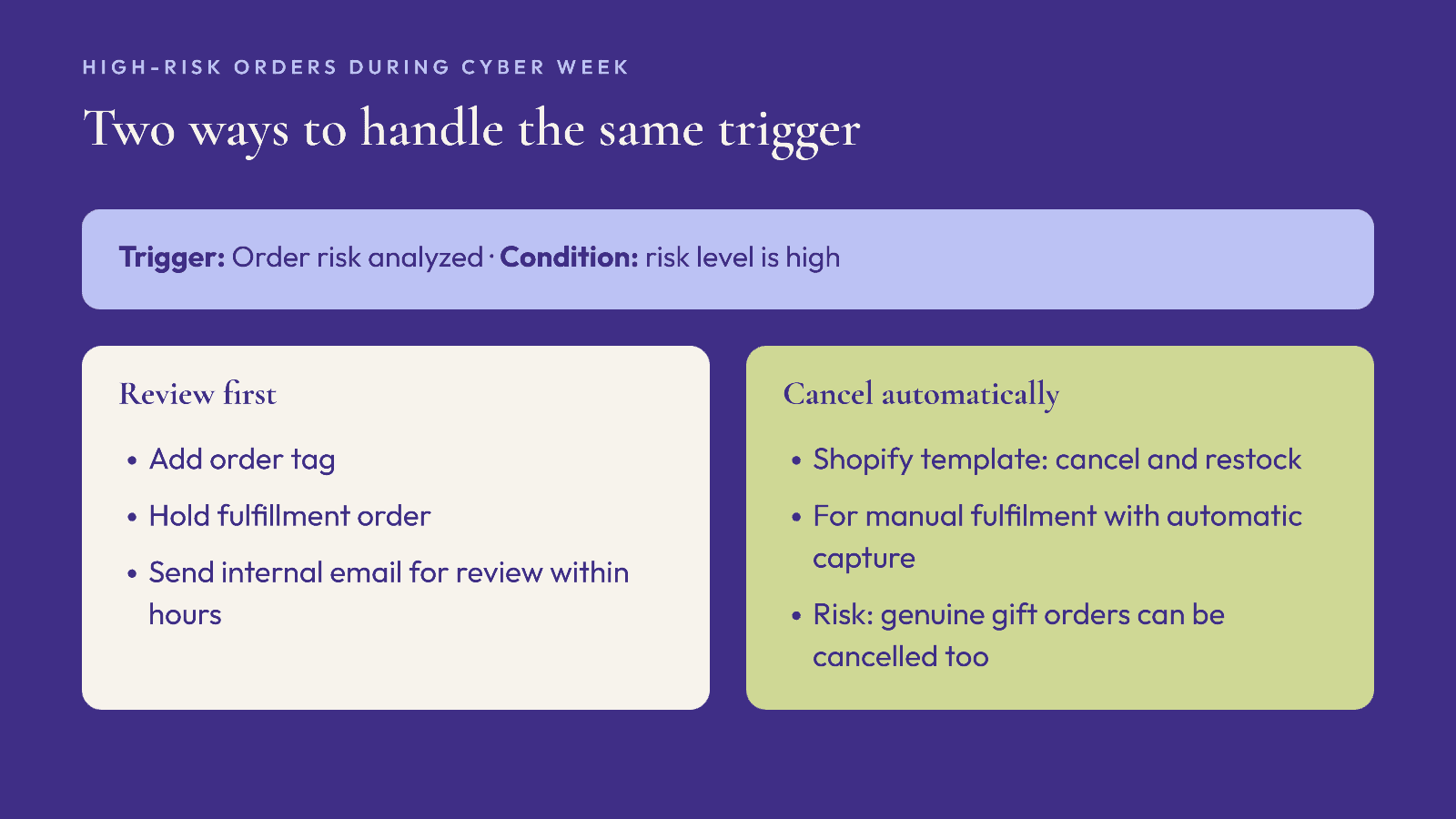
Shopify documents two related workflows. Both use the Order risk analyzed trigger, which relies on Shopify's own risk analysis, with a condition that the risk level is high. One adds a tag so the order can be reviewed; the other uses the Cancel order action and restocks it. Shopify notes the cancel template applies when orders are fulfilled manually and payments are captured automatically.
For BFCM: cancelling automatically can also cancel genuine customers whose orders simply look unusual, such as a first-time buyer sending a gift to a different address. A middle path is to add an order tag, use Hold fulfillment order, and send an internal email so a person reviews it within a few hours. For the wider picture on Cyber Week fraud and disputes, see our BFCM fraud and chargebacks playbook.
Workflow 4: flag unusually large orders
Shopify lists a template to "get notified about irregularly large order quantities." During a sale, a single order for ten of the same jacket in one size may be a reseller, a corporate gift order or a mistake. An internal email or a tag lets your team decide before the stock is gone for everyone else. Set the threshold by product: a multipack of socks is normal, ten identical coats is not.
Workflow 5: tag VIPs by lifetime spend
Shopify's template to "organize customers by lifetime spend tiers" tags customers based on order history. Those tags can drive early access to your Black Friday edit, a VIP-only code, or a different email series in your email platform. Decide the tiers before the sale so new customers who cross a threshold during Cyber Week are tagged in time for your December campaigns.
Workflow 6: route return requests
The Return requested trigger lets you tag the order, notify the right team member, or add the customer to a list for an exchange-first email. With gift returns arriving in January, catching the reason and the item early makes it easier to offer an exchange instead of a refund. Our holiday returns and January exchanges playbook covers the customer-facing side.
Workflow 7: a scheduled clean-up when the sale ends
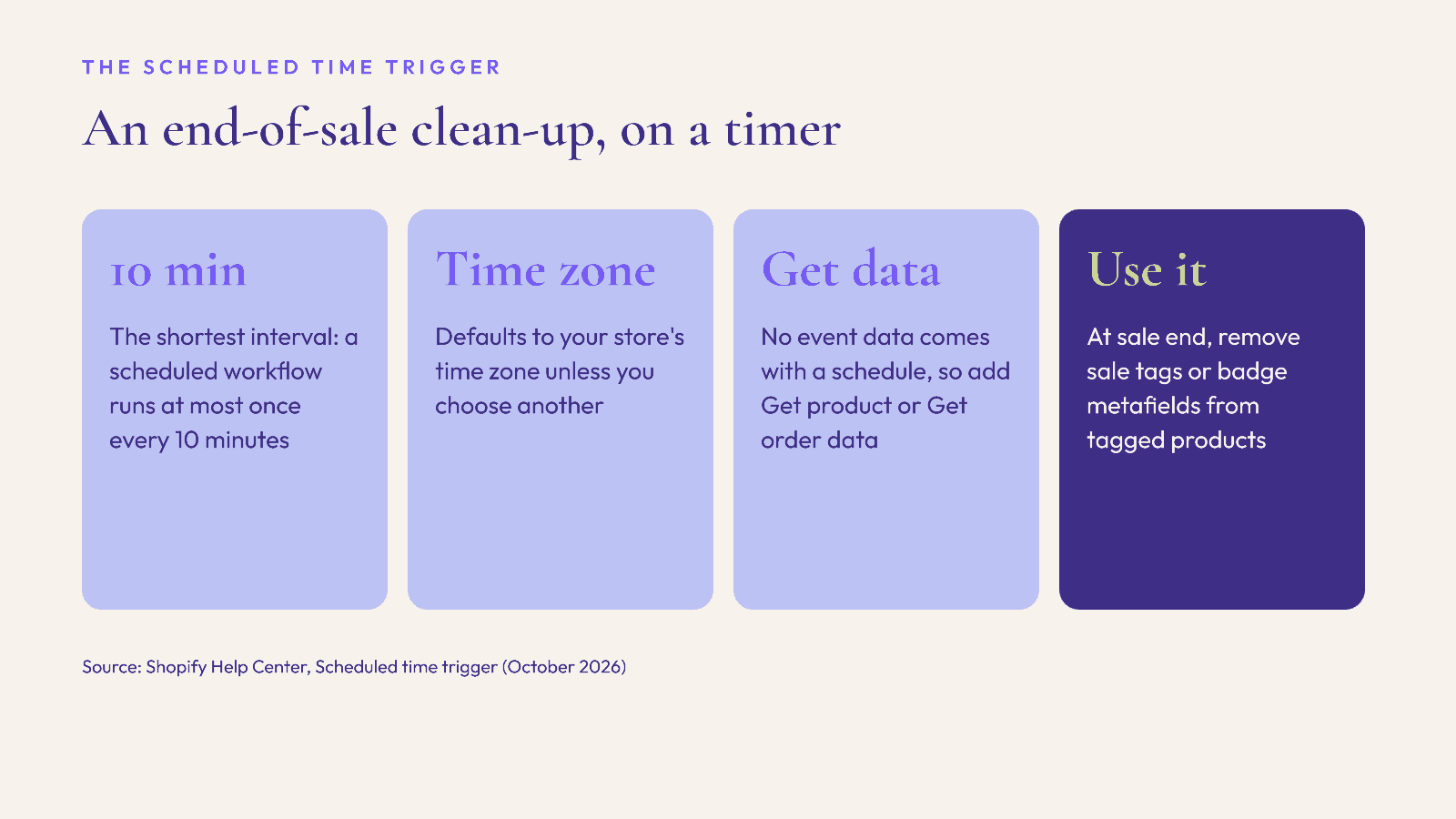
The Scheduled time trigger runs a workflow at a set date and time instead of after a store event. Shopify's documentation gives the details that matter for planning:
You can set a start date and time, add more than one schedule, and repeat by days, weeks or months.
The trigger can run at most once every 10 minutes.
If you do not choose a time zone, it uses your store's time zone.
A scheduled workflow has no event data, so you add a Get data action, such as Get product data, to find the products or orders to act on.
For BFCM: schedule a workflow for the minute your sale ends that gets products tagged for the sale and removes the tag or updates a metafield your theme uses for sale badges. Set the time zone explicitly so it matches the end time in your emails.
Before you switch them on
Add an error alert. Shopify lists a "Workflow error occurred" trigger. Use it to send an internal email so a failing workflow is noticed during the sale, not after.
Test with real events. Place a test order, move a test variant's stock across the threshold, and confirm each workflow runs once and only once.
Avoid loops. A workflow that adds a tag and another that triggers on that tag can fire each other. Map which workflows touch which tags.
Name an owner. Every alert should go to a person who can act on it during Cyber Week.
Where an AI shopping assistant fits
Flow keeps the back office running; it does not help the shopper choose. Elara for Commerce is an AI shopping assistant for Shopify fashion brands that styles shoppers in conversation, builds complete looks and offers virtual try-on, so shoppers who arrive unsure get a styled answer from your synced catalog rather than a dead end. Industry benchmarks report 4x conversion with AI shopping assistants (Neuwark 2026) and 25% higher average order value (Rep AI 2025); these are industry figures, not Elara results. Book a demo or start the 30-day free trial before peak.
FAQ
Is Shopify Flow free?
Yes. Shopify says Flow is a free app on the Basic, Grow, Advanced and Plus plans. Some features differ by plan; for example, the Send HTTP Request action is limited to Grow, Advanced and Plus.
Can Shopify Flow cancel high-risk orders automatically?
Yes. Shopify offers a template that uses the Order risk analyzed trigger and the Cancel order action, intended for stores that fulfil manually and capture payments automatically. Some teams prefer to tag and hold high-risk orders for review instead.
How do I stop a Shopify Flow low-stock alert from sending every time?
Add a condition on the prior inventory quantity, as Shopify's example does, so the workflow runs only when stock first drops to your threshold.
How often can a scheduled Shopify Flow workflow run?
At most once every 10 minutes, according to Shopify. It uses your store's time zone unless you choose a different one.
What happens if a Shopify Flow workflow fails?
You can use the Workflow error occurred trigger to send an internal email or tag, so someone is alerted when a workflow stops working.
Keep reading

Peak Season, Promotions, Shopify
BFCM 2026 Discount Stacking on Shopify: How Discount Combinations Actually Calculate
Which Shopify discounts can combine, the order they apply in, the limits that bite during Cyber Week, and a test routine to run before 27 November.

Peak Season, Marketing, Compliance
GivingTuesday 2026 Charity Promotions: What Shopify Fashion Brands Must Disclose in the US and UK
Planning a give-back capsule for 1 December? How to state the donation clearly, what US and UK rules expect, product-page copy you can adapt, and a launch checklist.

Peak Season, Compliance, Shopify
Selling to the EU This Christmas? The GPSR Checklist for Shopify Fashion Brands (2026)
What the EU General Product Safety Regulation means for Shopify fashion brands shipping Christmas orders to the EU: product page information, the EU responsible person, labels, accidents and recalls.