New research guide: The Confidence Economy, how AI is changing fashion commerce.
Peak Season, Returns, Google Shopping
·
Holiday Return Policies in Google Merchant Center: Extended Windows, Final Sale and Structured Data for BFCM 2026
How Shopify fashion brands set a holiday return window in Google Merchant Center, label final-sale items and mirror it with MerchantReturnPolicy seasonal overrides.
Mehul Agarwal, Founder & CEO

Last updated: October 2026
Quick answer: If you extend your return window for holiday gifts, tell Google as well as your shoppers. In Google Merchant Center, open the Return policies tab, set your standard policy (countries, return window, methods, fees, restocking fee, item condition and policy URL), then add an exception: a window extension for a date range, or a final-sale label for products that cannot be returned. On your site, mirror the same rules in MerchantReturnPolicy structured data with a returnPolicySeasonalOverride. Google's documentation says Merchant Center settings take precedence over markup, so treat Merchant Center as the source of truth and keep your Shopify return rules, written policy and markup consistent with it.
Black Friday falls on 27 November 2026 and Cyber Monday on 30 November. For fashion brands, many of the orders placed that week are gifts, and gift buyers want to know one thing before they check out: can the recipient return or exchange it after Christmas? Many brands answer with an extended holiday return window. The problem is that the extension often lives only in a banner or an FAQ, while the return policy shown on Google Shopping ads and free listings still says 30 days.
Google can show your return policy on Shopping ads, free listings and in Gmail, and its Merchant Center Help describes return policy as "a key factor for people who are making a purchasing decision." This guide covers how to set a holiday return policy in Merchant Center, how to mirror it in structured data, and how to keep both aligned with your Shopify return rules. It pairs with our guide to Google Merchant Center holiday delivery settings, which covers the shipping side.
Which return policy does Google believe?

Google can learn about your return policy from four places, and they do not carry equal weight. According to Google Search Central's documentation on merchant return policy structured data, the order of precedence, from strongest to weakest, is:
Content API for Shopping return settings.
Merchant Center or Search Console return settings.
Product-level merchant listing markup (a
MerchantReturnPolicyon anOffer).Organization-level markup (a
MerchantReturnPolicyon yourOrganization).
Google adds that if both markup and Search Console settings exist, it uses only the Search Console information. In practice, that means a holiday extension added only to your website markup can be overridden by an older standard policy sitting in Merchant Center.
There is also a fifth, weaker signal. Merchant Center Help explains that if a listing says the policy applies "For most items," Google inferred the policy from your website. Uploading your own policy replaces that notation, and your verified policy takes precedence. Policy status shows as Verified, Pending or Rejected, so check the status after any change.
Step 1: Set your standard policy in Merchant Center
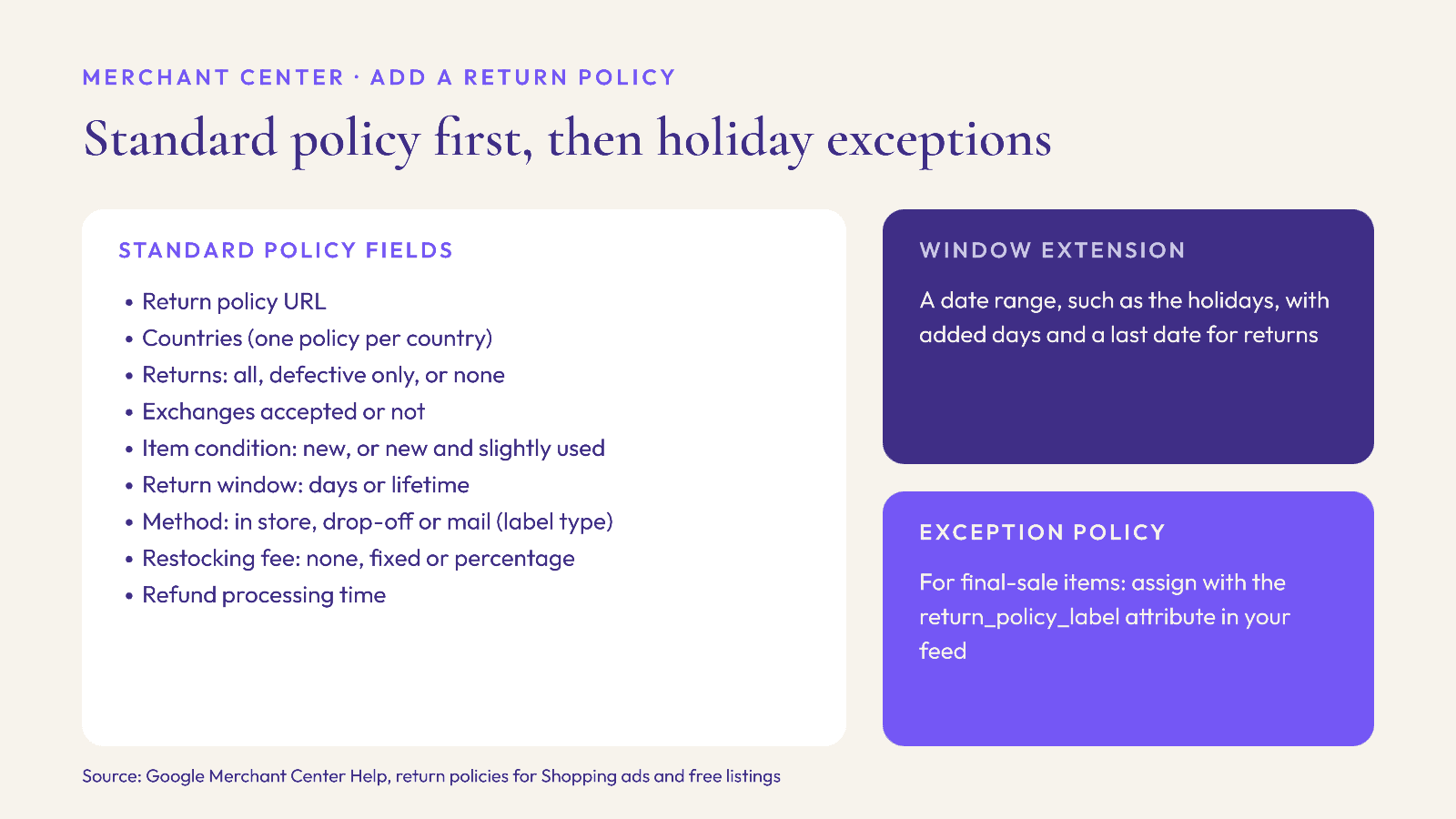
Merchant Center Help's article on return policies for Shopping ads and free listings lists the fields in the "Add a return policy" flow. Go to the Return policies tab (under Shipping and returns, shown as Delivery and returns in some accounts) and select Add return policy. Then set:
Return policy URL: the page on your site where the policy is written out.
Countries: the countries the policy applies to. A country can belong to only one policy, so a brand selling to the US and the UK needs to decide whether both share one policy or each has its own.
Returns: defective and non-defective items, defective items only, or no returns.
Exchanges: accepted or not.
Item condition: only new (unused, unopened) items, or new and slightly used items.
Return window: a set number of days, or a lifetime window.
Return method: in store, drop-off location or mail. For mail, choose how the label is provided: download and print, in the box, or paid by the customer.
Restocking fee: none, a fixed fee or a percentage of the product price. Google's Shopify-specific guide says to select "No cost" in the restocking fee section to offer free returns.
Refund processing time: the number of days before the customer receives a refund.
Policies can apply to all products, to groups of products or to a single product. Merchant Center may also suggest settings based on your website; review those suggestions rather than accepting them blindly, because they may reflect a policy page you are about to change.
Fashion-specific decisions before you save
Item condition and tags. Most fashion return policies require items to be unworn with tags attached. "New (unused, unopened)" is the closest match. If you accept tried-on items, say so on your policy page.
Exchanges. If you offer size exchanges, mark exchanges as accepted. Gift recipients often want a different size rather than a refund.
Return label. If you include a prepaid label in the box, choose that option; it is a selling point for gifts.
Step 2: Add a holiday window extension
Google's guide for Shopify users explains that after you create a policy, you can add exceptions, "such as an extended return window for a date range or final-sale items during the holiday season." Select the policy in the Return policies tab, click the plus icon under Actions, complete the Add an exception flow and save.
Merchant Center Help describes two kinds of change you can make:
Window extensions for set date ranges, such as holidays, defined by the added number of days and a last date for returns.
Exception policies that override parts of the standard policy for specific products, such as shorter windows or no returns. Each one gets an exception label.
A common holiday pattern for fashion is "items bought from 1 November to 24 December can be returned until 31 January." Whatever you choose, use the same dates everywhere: Merchant Center, your Shopify written policy, any checkout or product page messaging, and your structured data.
Final sale and exception labels
If some items are final sale (for example, pierced earrings, swimwear without hygiene liners, or heavily discounted Cyber Monday stock), create an exception policy for them. In your product feed, assign it with the return_policy_label attribute. According to Merchant Center Help, if you have only one policy you can skip the attribute or set it to "default"; if you have exceptions, products that use one get that exception's label, and the rest use "default" or a blank value.
Step 3: Mirror the policy in Shopify
Google's Shopify guide says adding your return policy in both Shopify and Merchant Center "helps ensure that Google accurately represents your policies in search results." On the Shopify side, Shopify's Help Center describes return rules that include:
Return window: presets of 14, 30 or 90 days, unlimited, or a custom number of days, with overrides for specific collections, products or variants. If an item falls under several overrides, the shortest one applies.
Return shipping cost: free, a flat rate per return, or the customer buys their own label.
Restocking fee: an optional percentage. Shopify notes that return fees are not deducted from refunds automatically, so you need to deduct them manually.
Final sale items: chosen by collection or by product. Shopify says "Your customers can't submit return or cancellation requests for final sale items."
One detail catches many brands out. Shopify notes that "The generated policy doesn't automatically include the return rules that you set up." If you extend your window in return rules, also update the written return and refund policy under Settings, Policies, so the page your Merchant Center policy links to says the same thing.
Step 4: Add structured data with a seasonal override
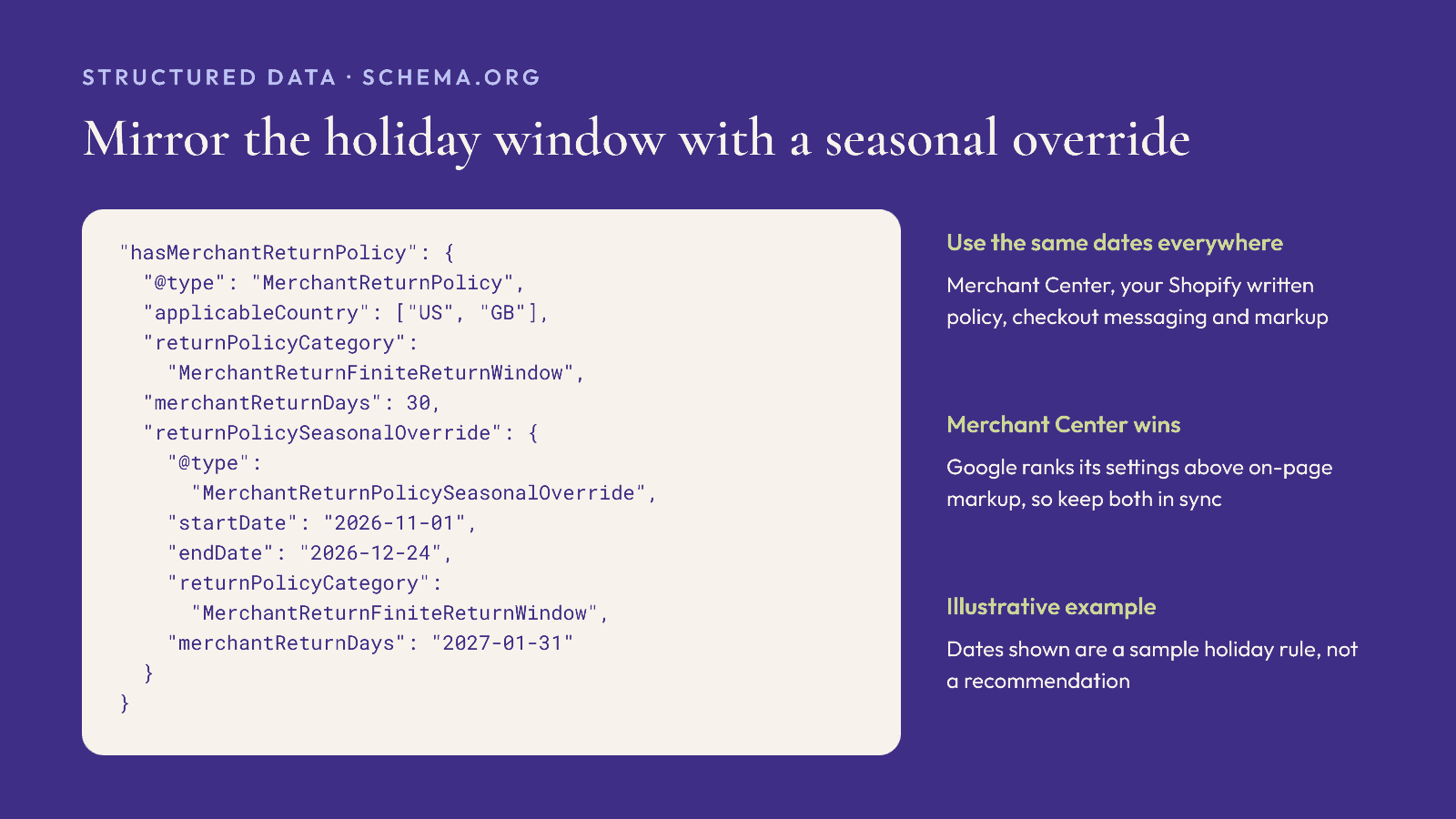
Structured data helps Google read your policy from your site and is the weakest of the signals above, so it should match Merchant Center rather than contradict it. Google Search Central recommends placing a standard policy under your Organization using hasMerchantReturnPolicy, ideally on one policy page rather than on every page, and using Offer-level markup only for products with a non-standard policy.
The required properties are either applicableCountry with returnPolicyCategory, or a merchantReturnLink. The category takes one of three values:
MerchantReturnFiniteReturnWindow, which also requiresmerchantReturnDays.MerchantReturnUnlimitedWindowfor no time limit.MerchantReturnNotPermittedfor no returns.
Useful recommended properties for fashion include returnFees (FreeReturn, ReturnFeesCustomerResponsibility or ReturnShippingFees), returnMethod (ReturnByMail, ReturnInStore, ReturnAtKiosk), itemCondition, refundType (FullRefund, ExchangeRefund, StoreCreditRefund), restockingFee, and separate customerRemorseReturnFees and itemDefectReturnFees if a wrong size and a faulty seam are treated differently.
For the holiday window, Google documents returnPolicySeasonalOverride, of type MerchantReturnPolicySeasonalOverride. It requires its own returnPolicyCategory (and merchantReturnDays for a finite window) and recommends startDate and endDate. You can supply several overrides as an array. Here, merchantReturnDays can be an integer, or a date, which suits a "return by 31 January" rule. Double-check that each end date falls after its start date before you deploy.
Pre-Black Friday checklist
Decide the holiday rule (purchase dates and last return date) and get sign-off from finance and customer service.
Update Merchant Center: standard policy, then a window extension and any final-sale exception policies.
Tag final-sale products in your feed with
return_policy_label.Update Shopify return rules and the written policy, since the template does not pull in return rules automatically.
Update structured data with a seasonal override using the same dates.
Check policy status in Merchant Center for Verified, and look out for "For most items" on your listings.
Brief your support team with the exact dates, so answers match what Google shows.
FAQ
Where does Google show my return policy?
Merchant Center Help says return policies can appear on Shopping ads, free listings and in Gmail. Google's Shopify guide adds that a clear return policy may also help a store earn a Top Quality Store badge.
Can I set a holiday return window in Google Merchant Center?
Yes. After creating a standard return policy, add an exception from the Return policies tab. Window extensions cover a date range with added days and a last return date.
Which wins if Merchant Center and my website markup disagree?
Merchant Center. Google Search Central lists Content API settings first, then Merchant Center or Search Console settings, then product-level markup, then organization-level markup.
What does "For most items" mean on my listing?
It means Google inferred your policy from your website. Uploading your own policy in Merchant Center replaces that notation.
How do I mark final sale items for Google?
Create an exception policy that allows no returns, then assign it to those products with the return_policy_label attribute in your feed.
Does Shopify update my written return policy when I change return rules?
No. Shopify says the generated policy does not automatically include the return rules you set up, so edit the written policy too.
Fewer gift returns start before checkout
An extended window reassures gift buyers, but the cheapest return is the one that never happens. Elara for Commerce is an AI shopping assistant for Shopify fashion brands that styles complete looks from your catalog in conversation, with virtual try-on, so shoppers buying for themselves or someone else can picture fit and pairing before they order. For more on the January side of peak, see our holiday returns and January exchanges playbook. Industry benchmarks put average order value with AI shopping assistants 25% higher (Rep AI 2025). Book a demo or start a 30-day free trial before Black Friday.
Keep reading
Peak Season, Compliance, Shopify
Selling to the EU This Christmas? The GPSR Checklist for Shopify Fashion Brands (2026)
What the EU General Product Safety Regulation means for Shopify fashion brands shipping Christmas orders to the EU: product page information, the EU responsible person, labels, accidents and recalls.

Peak Season, Shopify, Omnichannel
After the Last Shipping Day: A Christmas 2026 Local Pickup and Delivery Playbook for Shopify Fashion Brands
How Shopify fashion brands can keep selling physical products after the Christmas shipping cutoff, with pickup in store, local delivery zones and Google's pickup today annotation.

Peak Season, Accessibility, Conversion
Black Friday 2026 Accessibility Check: What the European Accessibility Act Means for Shopify Fashion Stores
What the European Accessibility Act asks of online stores, and a five-week plan to fix sale prices, swatches, size charts, pop-ups and forms on a Shopify fashion store before Black Friday.